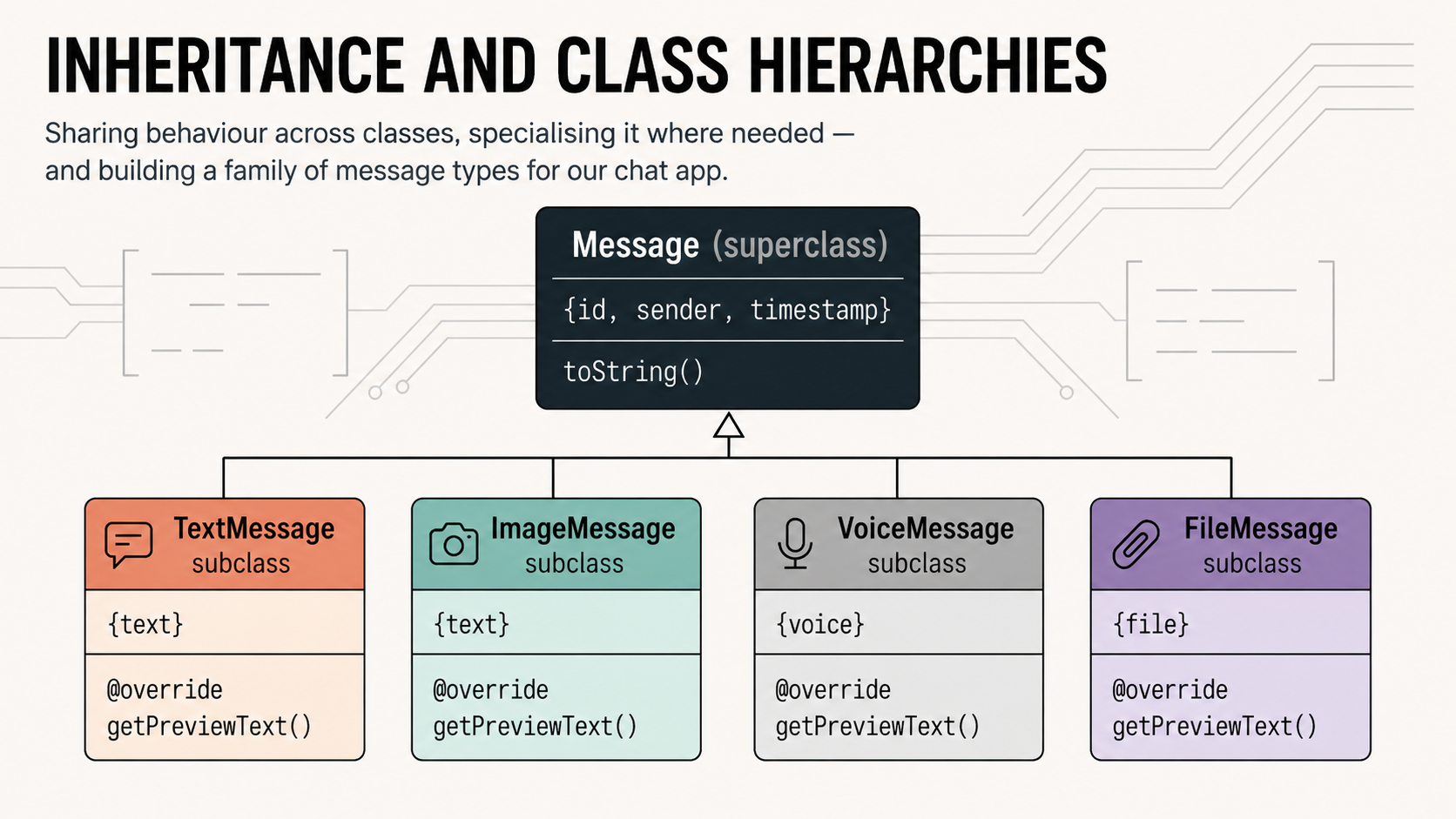
Every chat app needs more than one kind of message. A text message, an image, a voice note, a file attachment — they all share the same core structure but differ in their specific data and how they display themselves. Inheritance is the tool that lets you capture what’s shared once and describe only the differences in each subclass. This article builds a full message-type hierarchy and shows you exactly how it works.
1. The four pillars — where we are
We are now entering the Core Pillars phase of the series. Articles 3, 4, and 5 each tackle one of OOP’s foundational ideas in depth.

2. The problem inheritance solves
Imagine you need four message types for your chat app: a text message, an image message, a voice note, and a file attachment. Your first instinct might be to write four completely separate classes. Let’s see what that leads to.
❌ Without inheritance
class TextMessage {
  String id;
  String senderName;
  DateTime timestamp;
  bool isRead;
  String text; // unique
  void markAsRead() { ... }
  String getFormattedTime() { ... }
}

class ImageMessage {
  String id;        // duplicated
  String senderName; // duplicated
  DateTime timestamp;// duplicated
  bool isRead;      // duplicated
  String imageUrl; // unique
  void markAsRead() { ... } // dup
  String getFormattedTime() { ... } // dup
}
// ...and so on for VoiceMessage, FileMessage
✅ With inheritance
class Message {
  String id;
  String senderName;
  DateTime timestamp;
  bool isRead;
  void markAsRead() { ... }
  String getFormattedTime() { ... }
}

// Each subclass gets everything
// above for free. Only unique
// parts need to be written.

class TextMessage extends Message {
  String text; // only new thing
}

class ImageMessage extends Message {
  String imageUrl; // only new thing
}
Without inheritance, every change to shared logic — say, fixing a bug in getFormattedTime() — requires updating four files. With inheritance, you fix it once in Message and all subclasses benefit automatically.
Core idea
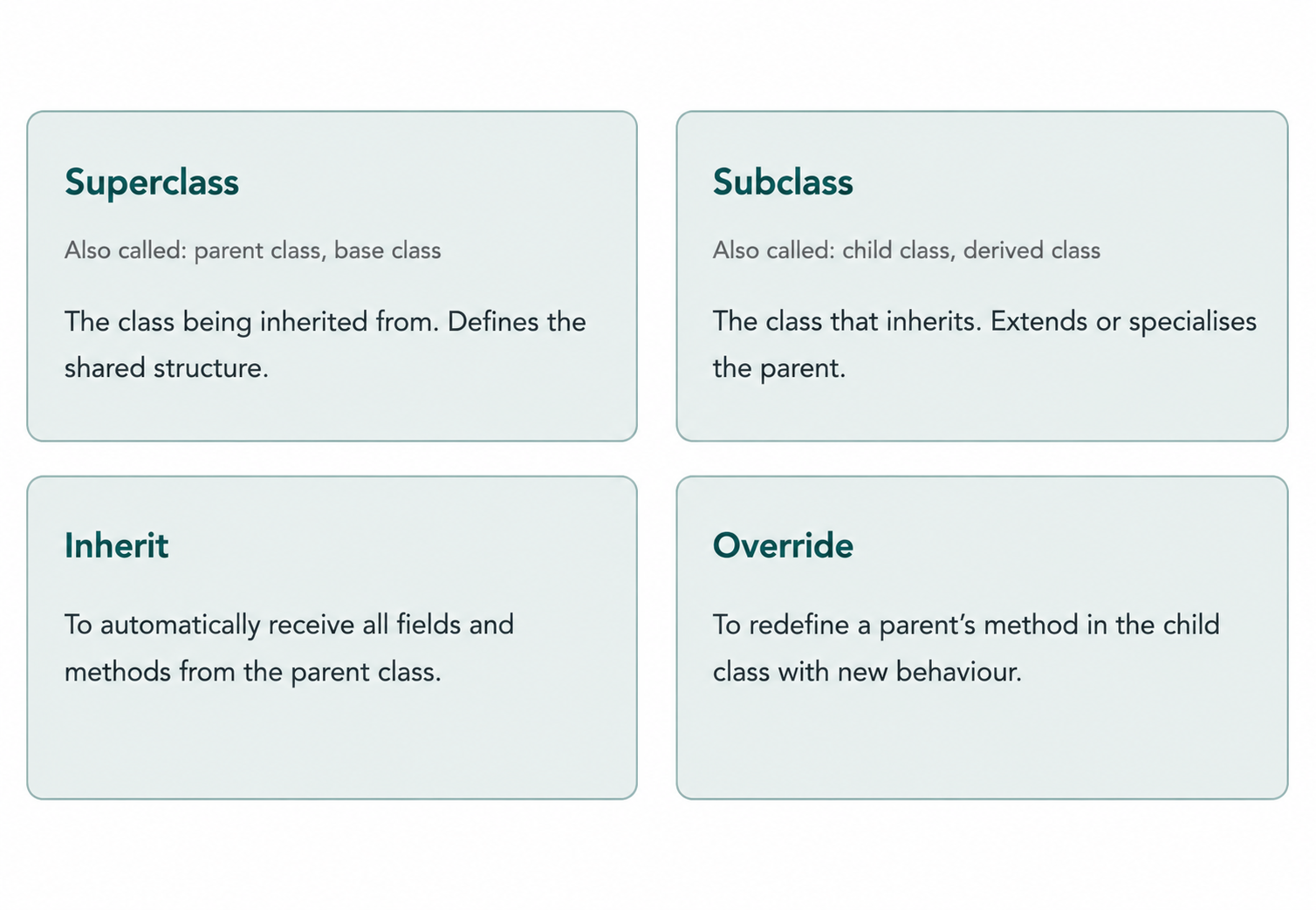
Inheritance lets a class (the child or subclass) automatically acquire all the fields and methods of another class (the parent or superclass), and then extend or override them as needed. It encodes the “is-a” relationship: a TextMessage is a Message.
3. The extends keyword
To make one class inherit from another, use the extends keyword in the class declaration. Let’s start with a simple example before applying it to our chat app.
dartanimals.dart
class Animal {
  String name;
  int age;

  Animal(this.name, this.age);

  void breathe() => print('$name breathes.');
  void eat()    => print('$name eats.');
}

// Dog inherits everything from Animal
class Dog extends Animal {
  String breed;

  // Must call Animal's constructor via super
  Dog(String name, int age, this.breed) : super(name, age);

  void bark() => print('$name says: Woof!');
}

class Cat extends Animal {
  bool isIndoor;

  Cat(String name, int age, this.isIndoor) : super(name, age);

  void purr() => print('$name purrs...');
}

void main() {
  final dog = Dog('Rex', 3, 'Labrador');
  final cat = Cat('Luna', 5, true);

  // Inherited from Animal — no duplication needed
  dog.breathe(); // Rex breathes.
  dog.eat();     // Rex eats.
  cat.breathe(); // Luna breathes.

  // Unique to each subclass
  dog.bark();  // Rex says: Woof!
  cat.purr();  // Luna purrs...

  // A Dog IS-A Animal — this is valid
  Animal a = dog;
  a.breathe(); // Rex breathes.
}
The key line is class Dog extends Animal. After that, Dog automatically has name, age, breathe(), and eat() — without writing them again. It only needs to declare what’s unique to a dog: breed and bark().
The is-a test
Before using inheritance, ask: “Is a Child a kind of Parent?” A Dog is an Animal ✓. A TextMessage is a Message ✓. If the relationship is “has a” instead (a User has a profile picture), use composition — a field — not inheritance.
4. Calling the parent with super
The super keyword lets a child class communicate with its parent. It has two uses: calling the parent’s constructor and calling the parent’s methods.
Calling the parent constructor
When a child class declares a constructor, it must ensure the parent’s fields are also initialised. You do this by chaining to the parent constructor using : super(...) at the end of the child’s constructor signature — in the initialiser list.
class Vehicle {
  final String brand;
  final int year;

  Vehicle(this.brand, this.year);

  void describe() => print('$year $brand');
}

class Car extends Vehicle {
  final int doors;

  // The ': super(brand, year)' call initialises Vehicle's fields
  Car(String brand, int year, this.doors)
      : super(brand, year);
}

class ElectricCar extends Car {
  final int rangeKm;

  // Multi-level: calls Car, which calls Vehicle
  ElectricCar(String brand, int year, this.rangeKm)
      : super(brand, year, 4);
}

void main() {
  final tesla = ElectricCar('Tesla', 2024, 580);
  tesla.describe(); // 2024 Tesla (inherited from Vehicle)
  print(tesla.rangeKm); // 580
  print(tesla.doors);   // 4
}
Calling the parent’s method
Sometimes a child wants to extend a parent method rather than replace it entirely. You can call the parent’s version using super.methodName():
class Animal {
  String name;
  Animal(this.name);

  String describe() => 'I am $name';
}

class Dog extends Animal {
  String breed;
  Dog(String name, this.breed) : super(name);

  @override
  String describe() {
    // Call parent's version, then append more info
    return '${super.describe()}, a $breed';
  }
}

void main() {
  print(Dog('Rex', 'Labrador').describe());
  // I am Rex, a Labrador
}
Pattern
Calling super.method() is useful when the child wants to add to the parent’s behaviour rather than replace it entirely. Think of it as saying: “do what you normally do, and then I’ll add my part.”
5. Overriding methods with @override
Method overriding is when a child class defines a method with the same name and signature as a method in the parent, replacing its behaviour. In Dart, you mark such methods with the @override annotation.
class Shape {
  String colour;
  Shape(this.colour);

  double area() => 0;

  @override
  String toString() => 'A $colour shape with area ${area().toStringAsFixed(2)}';
}

class Circle extends Shape {
  final double radius;
  Circle(String colour, this.radius) : super(colour);

  @override
  double area() => 3.14159 * radius * radius;
}

class Rectangle extends Shape {
  final double width, height;
  Rectangle(String colour, this.width, this.height) : super(colour);

  @override
  double area() => width * height;
}

void main() {
  print(Circle('red', 5));          // A red shape with area 78.54
  print(Rectangle('blue', 4, 6));  // A blue shape with area 24.00
}
Notice that Shape.toString() calls area(). When Circle overrides area() and you call toString() on a Circle, Dart automatically uses the Circle version of area(). This is the beginning of polymorphism — the topic of Article 4 — and you can already see its power here.
Why @override matters — the safety net
The @override annotation is not just documentation. It tells the Dart compiler: “I intend to override a method that exists in my parent.” If you mistype the method name, or if the parent’s method is later renamed, the compiler will immediately warn you that there is nothing to override — catching a bug that would otherwise be completely silent.
❌ Silent bug — no @override
class Circle extends Shape {
  // Typo: 'Area' not 'area'
  // Dart creates a NEW method!
  // Shape.area() still returns 0.
  double Area() => 3.14 * radius * radius;
}
✅ Compiler catches typo
class Circle extends Shape {
  @override
  // ❌ Compile error: 'Area' doesn't
  // override anything in Shape.
  // Fix the typo now, not in prod.
  double Area() => 3.14 * radius * radius;
}
Rule
Always write @override when you intend to override a method. The annotation costs nothing and may save you from a hard-to-find bug.
6. The Object class — root of everything
Here is something that surprises many beginners: every class in Dart implicitly extends Object. Even if you write class Message { } with no extends keyword, Dart quietly treats it as class Message extends Object { }.
This is why every object — no matter what type — always has these three methods available:
dart
// These come free from Object — every class has them:
String  toString()             // text representation
int     hashCode               // integer hash (getter)
bool    operator ==(Object other) // equality check
By default, == checks if two variables point to the same object in memory (reference equality). In many cases you want value equality — two different Message objects with the same id should be considered equal. To get this, you override both == and hashCode together. They must always be overridden as a pair.
class UserId {
  final String value;
  const UserId(this.value);

  @override
  bool operator ==(Object other) {
    if (identical(this, other)) return true;
    return other is UserId && other.value == value;
  }

  @override
  int get hashCode => value.hashCode;

  @override
  String toString() => 'UserId($value)';
}

void main() {
  final id1 = UserId('usr_001');
  final id2 = UserId('usr_001');

  print(id1 == id2);            // true  (value equality)
  print(identical(id1, id2));  // false (different objects in memory)
}
Always override them as a pair
If two objects are equal (a == b is true), they must have the same hashCode. Dart’s Map, Set, and other collections rely on this contract. Overriding == without hashCode will cause mysterious bugs in collections.
7. Type checking with is and as
Once you have a class hierarchy, you often receive objects typed as the parent but need to work with them as a specific child type. Dart gives you two operators for this.
The is operator — type checking
is returns true if an object is an instance of the given type (including subclasses):
void printInfo(Animal animal) {
  print(animal.name); // always safe — Animal has name

  if (animal is Dog) {
    // Inside this block, Dart KNOWS animal is a Dog.
    // No cast needed — this is called "type promotion".
    print(animal.breed); // safe! Dart auto-promotes the type
    animal.bark();        // safe!
  }

  if (animal is Cat) {
    print(animal.isIndoor); // safe inside this block
  }
}
Dart’s type promotion is a particularly elegant feature: inside an if (x is SomeType) block, the compiler already knows the type and you can access its specific members without any extra casting.
The as operator — type casting
as forces a cast. If the object is not actually that type at runtime, it throws a TypeError. Use it only when you are certain of the type and want to access subclass-specific members outside of an is check:
void main() {
  Animal a = Dog('Rex', 3, 'Poodle');

  // Safe: we know it's a Dog, so cast is fine
  final dog = a as Dog;
  print(dog.breed); // Poodle

  // Unsafe: a is NOT a Cat — throws TypeError at runtime!
  // final cat = a as Cat; // ❌ TypeError

  // Safer pattern: check first, then use
  if (a is Dog) {
    print(a.breed); // no cast needed — type promoted
  }
}
Best practice
Prefer if (x is SomeType) over x as SomeType. The is pattern is safe, promotes the type automatically, and reads clearly. Reserve as for situations where you have absolute certainty about the runtime type.
8. Building our chat app: message type hierarchy
Now let’s apply everything to our chat application. We’ll redesign Message as a proper parent class and build four concrete subclasses for each message type.
Step 1 — Refactor Message into a base class
The current Message class has a text field that only makes sense for text messages. We need to move the truly universal fields up to the base class and remove everything that’s type-specific.
// message.dart — the base class
class Message {
  // ── Fields shared by ALL message types ────────────
  final String id;
  final String senderName;
  final DateTime timestamp;
  bool _isRead;

  // ── Constructor ───────────────────────────────────
  Message({
    required this.id,
    required this.senderName,
    required this.timestamp,
    bool isRead = false,
  }) : _isRead = isRead;

  // ── Getters ───────────────────────────────────────
  bool get isRead => _isRead;

  // ── Shared methods ────────────────────────────────
  void markAsRead() => _isRead = true;

  String getFormattedTime() {
    final h = timestamp.hour.toString().padLeft(2, '0');
    final m = timestamp.minute.toString().padLeft(2, '0');
    return '$h:$m';
  }

  /// Returns a short preview string — each subclass overrides this.
  String preview() => 'Message';

  /// Shared structure: subclasses override preview() to customise.
  @override
  String toString() => '[${getFormattedTime()}] $senderName: ${preview()}';

  /// Value equality — two messages with the same id are the same message.
  @override
  bool operator ==(Object other) =>
      identical(this, other) || (other is Message && other.id == id);

  @override
  int get hashCode => id.hashCode;
}
Step 2 — The four message subclasses
// text_message.dart
class TextMessage extends Message {
  final String text;

  TextMessage({
    required String id,
    required String senderName,
    required DateTime timestamp,
    required this.text,
    bool isRead = false,
  }) : super(
    id: id, senderName: senderName,
    timestamp: timestamp, isRead: isRead,
  );

  @override
  String preview() {
    // Truncate long messages in list previews
    return text.length > 40
        ? '${text.substring(0, 40)}...'
        : text;
  }
}
// image_message.dart
class ImageMessage extends Message {
  final String imageUrl;
  final int width;
  final int height;
  final String? caption;

  ImageMessage({
    required String id,
    required String senderName,
    required DateTime timestamp,
    required this.imageUrl,
    required this.width,
    required this.height,
    this.caption,
    bool isRead = false,
  }) : super(
    id: id, senderName: senderName,
    timestamp: timestamp, isRead: isRead,
  );

  // Computed getter: aspect ratio
  double get aspectRatio => width / height;

  @override
  String preview() =>
      caption != null ? '📷 $caption' : '📷 Photo';
}
// voice_message.dart
class VoiceMessage extends Message {
  final String audioUrl;
  final int durationSeconds;
  bool _hasBeenListenedTo = false;

  VoiceMessage({
    required String id,
    required String senderName,
    required DateTime timestamp,
    required this.audioUrl,
    required this.durationSeconds,
    bool isRead = false,
  }) : super(
    id: id, senderName: senderName,
    timestamp: timestamp, isRead: isRead,
  );

  // Getter: formats seconds as "0:42"
  String get formattedDuration {
    final mins = durationSeconds ~/ 60;
    final secs = (durationSeconds % 60).toString().padLeft(2, '0');
    return '$mins:$secs';
  }

  bool get hasBeenListenedTo => _hasBeenListenedTo;

  void listen() {
    _hasBeenListenedTo = true;
    markAsRead(); // inherited from Message!
  }

  @override
  String preview() => '🎤 $formattedDuration';
}
// file_message.dart
class FileMessage extends Message {
  final String fileName;
  final String fileUrl;
  final int fileSizeBytes;

  FileMessage({
    required String id,
    required String senderName,
    required DateTime timestamp,
    required this.fileName,
    required this.fileUrl,
    required this.fileSizeBytes,
    bool isRead = false,
  }) : super(
    id: id, senderName: senderName,
    timestamp: timestamp, isRead: isRead,
  );

  // Computed getter: human-readable file size
  String get formattedSize {
    if (fileSizeBytes < 1024)
      return '$fileSizeBytes B';
    if (fileSizeBytes < 1024 * 1024)
      return '${(fileSizeBytes / 1024).toStringAsFixed(1)} KB';
    return '${(fileSizeBytes / (1024 * 1024)).toStringAsFixed(1)} MB';
  }

  // Getter: file extension, e.g. "pdf"
  String get extension {
    final parts = fileName.split('.');
    return parts.length > 1 ? parts.last.toLowerCase() : '';
  }

  @override
  String preview() => '📎 $fileName ($formattedSize)';
}
Step 3 — Using the hierarchy
// main.dart
void main() {
  final now = DateTime.now();

  // Create a mixed list of message types
  final List<Message> conversation = [
    TextMessage(
      id: 'm1', senderName: 'Alice', timestamp: now,
      text: 'Hey! I just sent you the contract.',
    ),
    FileMessage(
      id: 'm2', senderName: 'Alice', timestamp: now,
      fileName: 'contract_2024.pdf',
      fileUrl: 'https://files.example.com/contract.pdf',
      fileSizeBytes: 2621440, // 2.5 MB
    ),
    ImageMessage(
      id: 'm3', senderName: 'Bob', timestamp: now,
      imageUrl: 'https://img.example.com/photo.jpg',
      width: 1920, height: 1080,
      caption: 'Check out this view!',
    ),
    VoiceMessage(
      id: 'm4', senderName: 'Bob', timestamp: now,
      audioUrl: 'https://audio.example.com/note.m4a',
      durationSeconds: 42,
    ),
  ];

  // Print conversation — toString() calls preview() on each type
  print('── Conversation ──');
  for (final msg in conversation) {
    print(msg); // polymorphic! Each type prints differently
  }
  // [HH:MM] Alice: Hey! I just sent you the contract.
  // [HH:MM] Alice: contract_2024.pdf (2.5 MB)
  // [HH:MM] Bob: Check out this view!
  // [HH:MM] Bob: 0:42 (voice)

  print('\n── Unread count: ${conversation.where((m) => !m.isRead).length} ──');

  // Mark all as read — markAsRead() is inherited by all types
  for (final msg in conversation) {
    msg.markAsRead();
  }

  // Type-specific handling with is-checks
  print('\n── File attachments ──');
  for (final msg in conversation) {
    if (msg is FileMessage) {
      // Type promoted — msg.formattedSize and msg.extension are accessible
      print('  ${msg.fileName} (${msg.extension}) — ${msg.formattedSize}');
    }
    if (msg is VoiceMessage) {
      print('  Voice note: ${msg.formattedDuration}');
    }
  }

  // Value equality via overridden ==
  final duplicate = TextMessage(
    id: 'm1', senderName: 'Alice', timestamp: now, text: 'Duplicate',
  );
  print('\nm1 == duplicate? ${conversation[0] == duplicate}'); // true (same id)
}
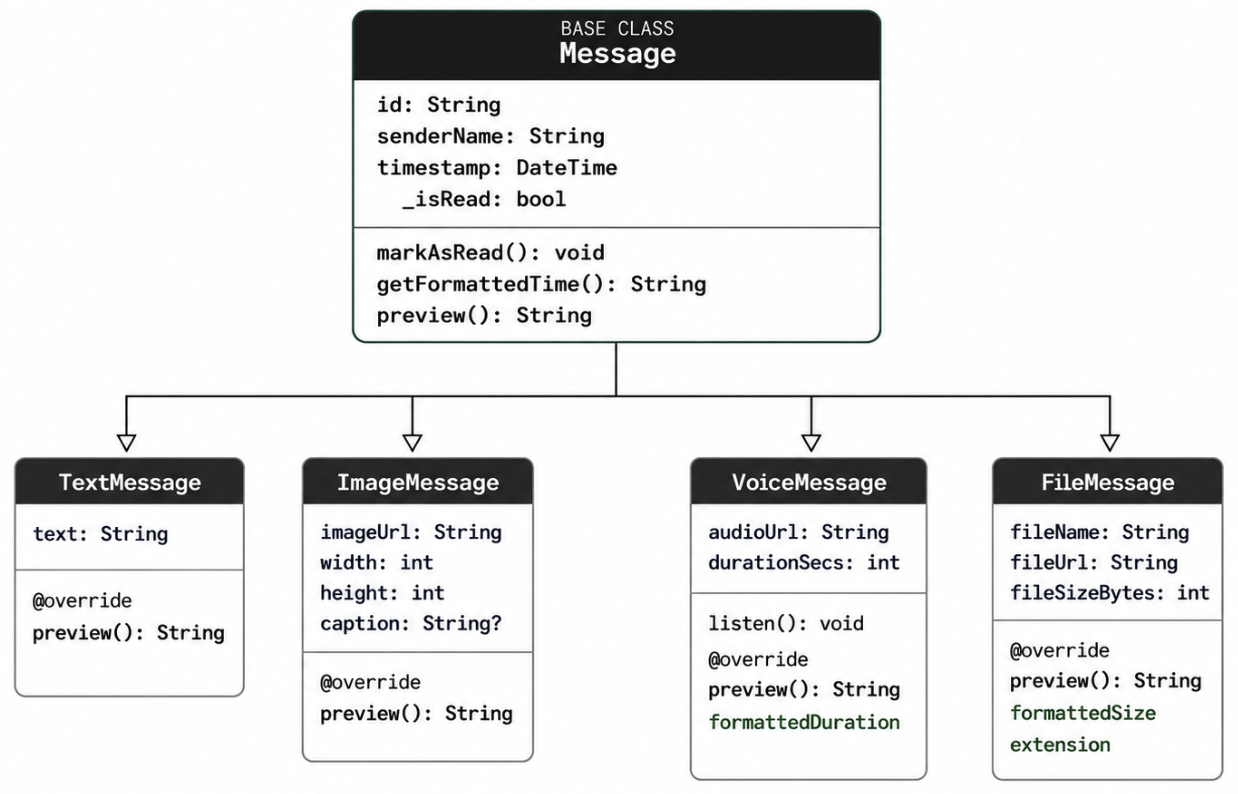
9. The full class diagram
Here is the complete inheritance hierarchy we’ve built for our chat app’s message system.
10. Exercises
Exercise 1 — Extend the hierarchy
Add a fifth message type: LocationMessage. It should extend Message and add latitude and longitude fields (both double). Add a computed getter mapsUrl that returns a Google Maps URL string like https://maps.google.com/?q=10.762622,106.660172. Override preview() to return 'Location'. Write a main() that creates one, adds it to a mixed message list, and prints all messages.
Exercise 2 — Type dispatch
Write a function void describeMessage(Message msg) that uses is-checks to print a detailed description for each type. For a TextMessage it should print the full text. For an ImageMessage it should print the image dimensions and caption (if any). For a VoiceMessage it should print whether it has been listened to. For a FileMessage it should print the file extension and formatted size. For any unknown type it should print 'Unknown message type'.
Exercise 3 — Override == and hashCode
Currently, two Message objects with the same id are considered equal regardless of their type. Improve the equality check so that a TextMessage and a FileMessage with the same id are not equal. Hint: include runtimeType in the equality condition and combine the hash codes using Dart’s Object.hash() or the XOR operator. Write tests in main() to verify your implementation.