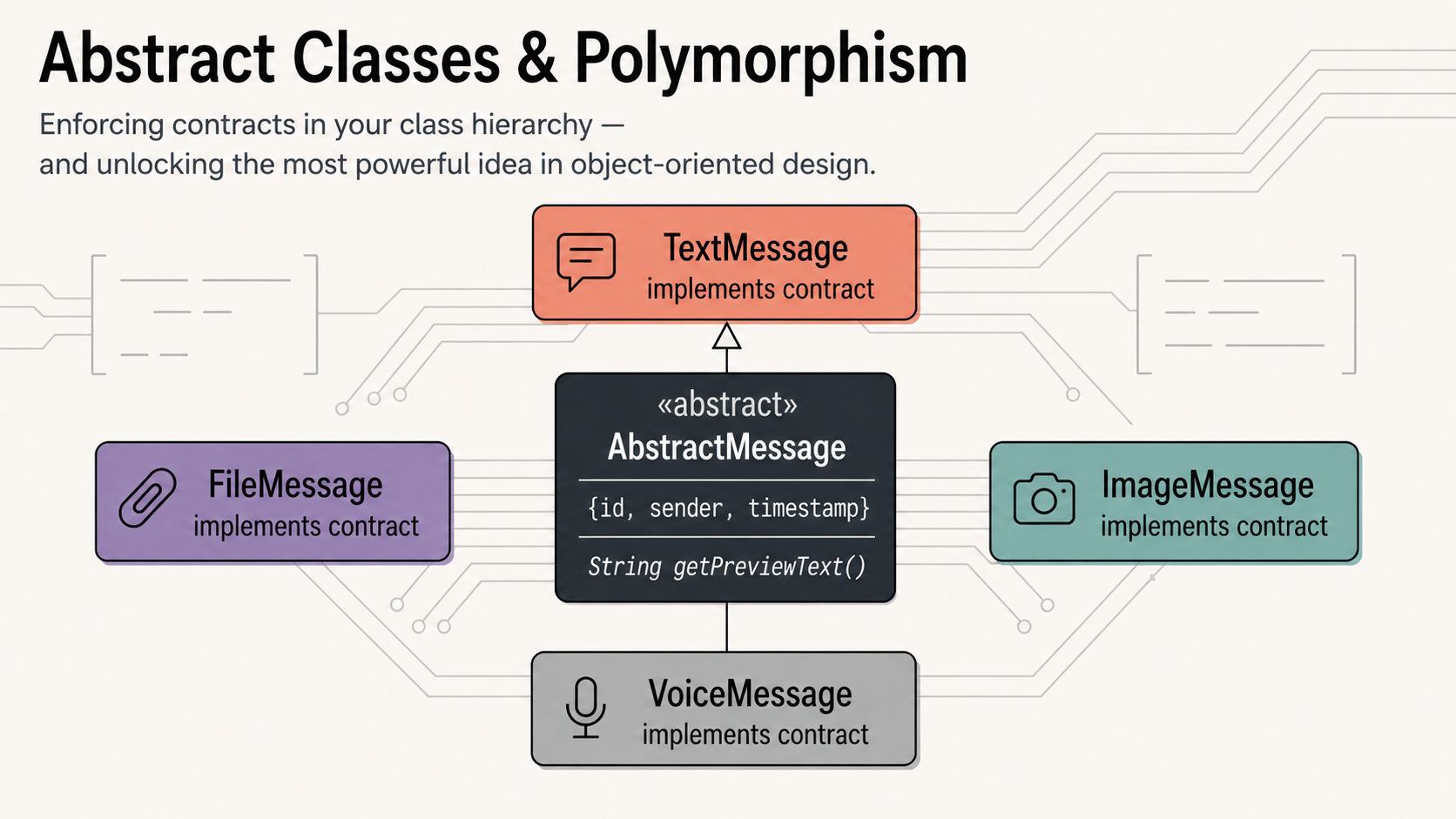
Polymorphism is often described as the most powerful pillar of OOP. It is the ability to write code that works with a family of types through a single shared interface — code that automatically adapts to each type without needing to know which one it’s dealing with. Abstract classes are the mechanism that makes this safe, enforced, and compiler-guaranteed. By the end of this article, you’ll understand why experienced developers reach for abstract classes first when designing a system.
1. The four pillars — where we are

We’ve covered two pillars. Article 4 tackles the third — and arguably most impactful — one. Polymorphism does not require new syntax to understand; it requires a shift in how you think about writing code that works with objects.
2. The fragile base class problem
At the end of Article 3, our Message base class looks like this:
message.dart (Article 3 version)
class Message {
  final String id;
  final String senderName;
  final DateTime timestamp;
  bool _isRead;

  Message({ required this.id, required this.senderName,
             required this.timestamp, bool isRead = false })
      : _isRead = isRead;

  // This is fragile — nothing forces subclasses to override it
  String preview() => 'Message';

  void markAsRead() => _isRead = true;
  bool get isRead => _isRead;
}
This design has two quiet problems:
Problem 1 — Direct instantiation. Nothing stops a developer from writing final m = Message(id: '1', senderName: 'Alice', timestamp: DateTime.now()). But a bare Message object has no content — no text, no image, no file. It is a meaningless object that should never exist on its own. The design should make it impossible to create one.
Problem 2 — Forgettable override. If a new developer adds a ReactionMessage subclass and forgets to override preview(), the chat list will silently display the useless string "Message" for every reaction. The compiler won’t say a word. The bug only appears at runtime, in production, when a user notices something looks wrong.
❌ Fragile — silent failures
// Both of these compile fine:

// Problem 1: meaningless object
final m = Message(
  id: 'x',
  senderName: 'Alice',
  timestamp: DateTime.now(),
);

// Problem 2: forgot to override
class ReactionMessage
    extends Message {
  String emoji;
  // No preview() override...
  // shows "Message" at runtime
}
✅ Abstract — compiler enforced
// Now the compiler catches both:

// Problem 1: compile error!
// Cannot instantiate abstract class
final m = Message(...); // ❌

// Problem 2: compile error!
// Missing concrete impl of preview()
class ReactionMessage
    extends Message {
  String emoji;
  // ❌ must implement preview()
}
The solution to both problems is one keyword: abstract.
3. The abstract keyword
Marking a class abstract does exactly two things:
First, it prevents the class from being directly instantiated. Message() becomes a compile error. The class can only be used as a base that other classes extend.
Second, it allows (but does not require) the class to declare abstract methods — method signatures with no body, which subclasses are then required to implement.
dart
// Adding the abstract keyword to the class declaration
abstract class Message {
  // ... fields and concrete methods are unchanged
}

void main() {
  // ❌ Compile error: Cannot instantiate abstract class 'Message'
  // final m = Message(id: '1', senderName: 'Alice', timestamp: ...)

  // ✅ This is fine — TextMessage is concrete
  final m = TextMessage(id: '1', senderName: 'Alice',
      timestamp: DateTime.now(), text: 'Hello!');
}
Intent matters
The abstract keyword is also a communication tool. When another developer reads abstract class Message, they immediately understand: this class exists to be extended, not instantiated. The design is self-documenting.
4. Abstract methods — mandatory contracts
An abstract method is a method declared inside an abstract class with no body — just the signature. It is a contract: any non-abstract subclass must provide a concrete implementation, or it won’t compile.
abstract class Shape {
  // Abstract method — no body, no braces, just a semicolon
  double area();
  double perimeter();

  // Concrete method — has a body, inherited as-is
  void describe() {
    print('Area: ${area().toStringAsFixed(2)}, '
          'Perimeter: ${perimeter().toStringAsFixed(2)}');
  }
}

class Circle extends Shape {
  final double radius;
  Circle(this.radius);

  @override
  double area() => 3.14159 * radius * radius;

  @override
  double perimeter() => 2 * 3.14159 * radius;
}

class Rectangle extends Shape {
  final double width, height;
  Rectangle(this.width, this.height);

  @override
  double area() => width * height;

  @override
  double perimeter() => 2 * (width + height);
}

// ❌ This class won't compile — it's missing area() and perimeter()
// class Triangle extends Shape {
//   final double base, height;
//   Triangle(this.base, this.height);
// }

void main() {
  final shapes = [Circle(5), Rectangle(4, 6)];
  for (final s in shapes) {
    s.describe(); // inherited concrete method calls overridden area/perimeter
  }
  // Area: 78.54, Perimeter: 31.42
  // Area: 24.00, Perimeter: 20.00
}
Notice the abstract methods: double area(); and double perimeter();. No braces, no body — just a semicolon. Every concrete subclass must implement them. The compiler verifies this at compile time, not runtime.
Abstract classes cannot have abstract constructors
You can define constructors in an abstract class — they are used by subclasses via super(). But you cannot mark a constructor itself as abstract. The constructor of an abstract class exists purely to be called by child constructors.
5. Mixing abstract and concrete members
One of the most useful aspects of abstract classes is that they can contain both abstract and concrete members in any combination. This gives you fine-grained control over what subclasses must implement versus what they inherit for free.
abstract class Report {
  final String title;
  final DateTime generatedAt;

  Report(this.title) : generatedAt = DateTime.now();

  // ── Abstract: subclasses MUST implement these ──────
  String generateBody();    // the actual report content
  String getFormat();       // 'PDF', 'CSV', 'HTML', etc.

  // ── Concrete: shared by all subclasses ─────────────
  String generateHeader() {
    return '=== $title ===\nGenerated: $generatedAt\n';
  }

  // Calls the abstract method — works for all subclasses
  String generate() {
    return '${generateHeader()}${generateBody()}';
  }

  @override
  String toString() => 'Report($title, format: ${getFormat()})';
}

class SalesReport extends Report {
  final double totalSales;
  SalesReport(this.totalSales) : super('Sales Report');

  @override
  String generateBody() => 'Total Sales: \$$totalSales\n';

  @override
  String getFormat() => 'PDF';
}

class UserReport extends Report {
  final int activeUsers;
  UserReport(this.activeUsers) : super('User Activity Report');

  @override
  String generateBody() => 'Active Users: $activeUsers\n';

  @override
  String getFormat() => 'CSV';
}

void main() {
  final reports = [SalesReport(48500.0), UserReport(1024)];
  for (final r in reports) {
    print(r.generate()); // header is shared; body is unique
  }
}
The generate() method is defined once in the abstract class and calls generateBody() — which each subclass implements differently. The abstract class provides the template; the subclasses fill in the blanks. This pattern is so useful it has a name: the Template Method pattern, which we’ll revisit formally in Article 7.
6. Polymorphism — the main event
Polymorphism comes from Greek: poly (many) + morphe (form). In OOP it means the ability to treat objects of different types uniformly through a shared type — while each object responds in its own specific way.
The most striking demonstration is a single loop that works correctly across an entire family of types:
void main() {
  // A list typed as List<Shape> — holds any concrete subclass
  final List<Shape> shapes = [
    Circle(5),
    Rectangle(4, 6),
    Circle(3),
    Rectangle(10, 2),
  ];

  // One loop — but each shape knows its own area calculation
  for (final shape in shapes) {
    shape.describe();
  }

  // We can even aggregate across all types uniformly
  final totalArea = shapes.fold(0.0, (sum, s) => sum + s.area());
  print('Total area: ${totalArea.toStringAsFixed(2)}');
}
The loop doesn’t know — and doesn’t care — whether it’s dealing with a Circle or a Rectangle. It just calls describe() on a Shape. The correct version of area() runs automatically for each object. That is polymorphism.
The architectural payoff
Code that is written in terms of an abstract type — Shape, Message, Report — automatically works with every type that will ever extend it, including types that don’t exist yet. Add a Triangle class six months from now, implement area() and perimeter(), and the loop above handles it perfectly without a single change. This is what makes polymorphism so transformative: it lets the future extend the present without breaking it.
7. Dynamic dispatch — how it works under the hood
When you call shape.area() on a variable typed as Shape, Dart has to figure out which area() to call at runtime — the Circle version or the Rectangle version. This mechanism is called dynamic dispatch (also called runtime polymorphism).
Dart resolves method calls based on the actual type of the object at runtime, not the declared type of the variable. A variable declared as Shape might hold a Circle at runtime — and Dart will always call Circle‘s area().
dart
void main() {
  // Variable type: Shape. Actual object: Circle.
  Shape shape = Circle(5);

  // Dart looks at the ACTUAL object (Circle), not the variable type (Shape)
  print(shape.area()); // 78.539... — Circle's area() is called

  // Reassign to a Rectangle — same variable, different object
  shape = Rectangle(4, 6);
  print(shape.area()); // 24.0 — Rectangle's area() is called

  // The decision happens at RUNTIME, not compile time
}
Under the hood, each object carries a reference to its class’s method table (a vtable). When Dart calls a method, it looks up the actual runtime type’s method table and calls the correct implementation. This lookup is extremely fast — effectively a single pointer dereference.
Compile-time vs. runtime
The Dart compiler guarantees at compile time that any method you call on a Shape exists in Shape. But the decision of which version of that method to run is made at runtime, based on the actual object. This is the essence of dynamic dispatch.
8. Polymorphism in function signatures
Polymorphism isn’t just about loops. It appears anywhere you write a function that accepts a base type — that function automatically works with every subtype.
// This function accepts any Shape — Circle, Rectangle, future types
void printShapeInfo(Shape shape) {
  print('Type: ${shape.runtimeType}');
  print('Area: ${shape.area().toStringAsFixed(2)}');
  print('Perimeter: ${shape.perimeter().toStringAsFixed(2)}');
}

// This function works on a whole collection of any Shape
Shape findLargest(List<Shape> shapes) {
  return shapes.reduce((a, b) => a.area() > b.area() ? a : b);
}

void main() {
  printShapeInfo(Circle(7));       // works
  printShapeInfo(Rectangle(3, 8)); // works

  final shapes = [Circle(2), Rectangle(10, 5), Circle(8)];
  final largest = findLargest(shapes);
  print('Largest: ${largest.runtimeType} with area ${largest.area().toStringAsFixed(2)}');
  // Largest: Circle with area 201.06
}
printShapeInfo and findLargest are completely agnostic to which concrete type they receive. They work today, and they’ll work tomorrow when someone adds a Triangle or Hexagon — without any modification.
Design principle
Write functions and methods in terms of the most general type that satisfies your needs. If your function only needs to call area(), accept Shape — not Circle. This makes your code reusable across the entire hierarchy, present and future.
9. Building our chat app: the notification system
Now let’s apply everything to our chat app. We’ll do two things: first, upgrade Message to a proper abstract class with enforced abstract methods. Second, build a polymorphic NotificationService that handles all message types without knowing their specifics.
Step 1 — Upgrade Message to an abstract class
// message.dart — now abstract
abstract class Message {
  // ── Shared fields ─────────────────────────────────
  final String id;
  final String senderName;
  final DateTime timestamp;
  bool _isRead;

  // ── Constructor (called by subclasses via super) ───
  Message({
    required this.id,
    required this.senderName,
    required this.timestamp,
    bool isRead = false,
  }) : _isRead = isRead;

  // ── Abstract methods — every subclass MUST implement ─

  /// A short string for chat list previews, e.g. "Photo"
  String preview();

  /// The content type, e.g. "text", "image", "voice", "file"
  String contentType();

  // ── Concrete methods — shared by all subclasses ────
  bool get isRead => _isRead;

  void markAsRead() => _isRead = true;

  String getFormattedTime() {
    final h = timestamp.hour.toString().padLeft(2, '0');
    final m = timestamp.minute.toString().padLeft(2, '0');
    return '$h:$m';
  }

  // toString() calls the abstract preview() — works for all types
  @override
  String toString() =>
      '[${getFormattedTime()}] $senderName: ${preview()}';

  @override
  bool operator ==(Object other) =>
      identical(this, other) ||
      (other is Message && other.id == id && other.runtimeType == runtimeType);

  @override
  int get hashCode => Object.hash(id, runtimeType);
}
Step 2 — Update subclasses with contentType()
Each subclass now needs to implement both preview() (already done in Article 3) and the new contentType(). Here is the update pattern — shown once for TextMessage, the same applies to the others:
text_message.dart (updated)
class TextMessage extends Message {
  final String text;

  TextMessage({ required String id, required String senderName,
    required DateTime timestamp, required this.text, bool isRead = false })
      : super(id: id, senderName: senderName, timestamp: timestamp, isRead: isRead);

  @override
  String preview() => text.length > 40 ? '${text.substring(0, 40)}...' : text;

  @override
  String contentType() => 'text';
}

// ImageMessage, VoiceMessage, FileMessage follow the same pattern:
// contentType() returns 'image', 'voice', 'file' respectively
Step 3 — The abstract NotificationService
Now for the centrepiece of this article’s chat app section. A notification service needs to know how to display a message — but it shouldn’t care which type of message it is. That’s polymorphism doing the work.
// notification_service.dart
abstract class NotificationService {
  // ── Abstract: each service decides HOW to notify ──
  void sendNotification(String title, String body);

  // ── Concrete: the WHAT to notify is always the same ─
  /// Notify for a single message — works for ANY message type
  void notify(Message message) {
    final title = message.senderName;
    final body  = message.preview(); // ← polymorphic call!
    sendNotification(title, body);
  }

  /// Notify for a batch — summarise instead of spamming
  void notifyBatch(List<Message> messages) {
    if (messages.isEmpty) return;
    if (messages.length == 1) {
      notify(messages.first);
      return;
    }
    final senders = messages.map((m) => m.senderName).toSet().join(', ');
    sendNotification(
      '${messages.length} new messages',
      'From: $senders',
    );
  }

  /// Group messages by content type for analytics
  Map<String, int> getTypeBreakdown(List<Message> messages) {
    final counts = <String, int>{};
    for (final msg in messages) {
      // contentType() is abstract — each type answers differently
      final type = msg.contentType();
      counts[type] = (counts[type] ?? 0) + 1;
    }
    return counts;
  }
}
Step 4 — Two concrete notification services
// push_notification_service.dart
// Simulates sending a push notification to a device
class PushNotificationService extends NotificationService {
  final String deviceToken;

  PushNotificationService(this.deviceToken);

  @override
  void sendNotification(String title, String body) {
    // In a real app: call Firebase, APNs, etc.
    print('PUSH → [$deviceToken]');
    print('   Title: $title');
    print('   Body:  $body');
  }
}

// Simulates showing an in-app banner
class InAppNotificationService extends NotificationService {
  final List<String> _log = [];

  @override
  void sendNotification(String title, String body) {
    final entry = 'BANNER | $title: $body';
    _log.add(entry);
    print(entry);
  }

  List<String> get log => List.unmodifiable(_log);
}
Step 5 — Putting it all together
void main() {
  final now = DateTime.now();

  // A mixed conversation — four different types
  final List<Message> incoming = [
    TextMessage(id: '1', senderName: 'Alice', timestamp: now,
        text: 'Are you coming to the meeting?'),
    ImageMessage(id: '2', senderName: 'Bob', timestamp: now,
        imageUrl: 'https://img.example.com/map.png',
        width: 800, height: 600, caption: 'Here is the venue'),
    VoiceMessage(id: '3', senderName: 'Alice', timestamp: now,
        audioUrl: 'https://audio.example.com/msg.m4a', durationSeconds: 18),
    FileMessage(id: '4', senderName: 'Bob', timestamp: now,
        fileName: 'agenda.pdf', fileUrl: 'https://files.example.com/agenda.pdf',
        fileSizeBytes: 512000),
  ];

  // ── Push notifications ─────────────────────────────
  final push = PushNotificationService('device_abc123');

  print('── Individual notifications ──');
  for (final msg in incoming) {
    // notify() calls preview() — which each type implements differently
    push.notify(msg);
  }

  print('\n── Batch notification ──');
  push.notifyBatch(incoming);

  // ── In-app banners ─────────────────────────────────
  print('\n── In-app banners ──');
  final inApp = InAppNotificationService();
  for (final msg in incoming) {
    inApp.notify(msg);
  }

  // ── Analytics: type breakdown ──────────────────────
  print('\n── Content type breakdown ──');
  final breakdown = push.getTypeBreakdown(incoming);
  breakdown.forEach((type, count) =>
      print('  $type: $count'));
  // text: 1
  // image: 1
  // voice: 1
  // file: 1

  // ── The polymorphism proof ──────────────────────────
  // NotificationService accepts any Message subtype.
  // When we add ReactionMessage next month, this code needs no changes.
  print('\n── Unread messages preview ──');
  incoming
      .where((m) => !m.isRead)
      .forEach((m) => print('  ${m.toString()}'));
}
10. The full abstract class diagram
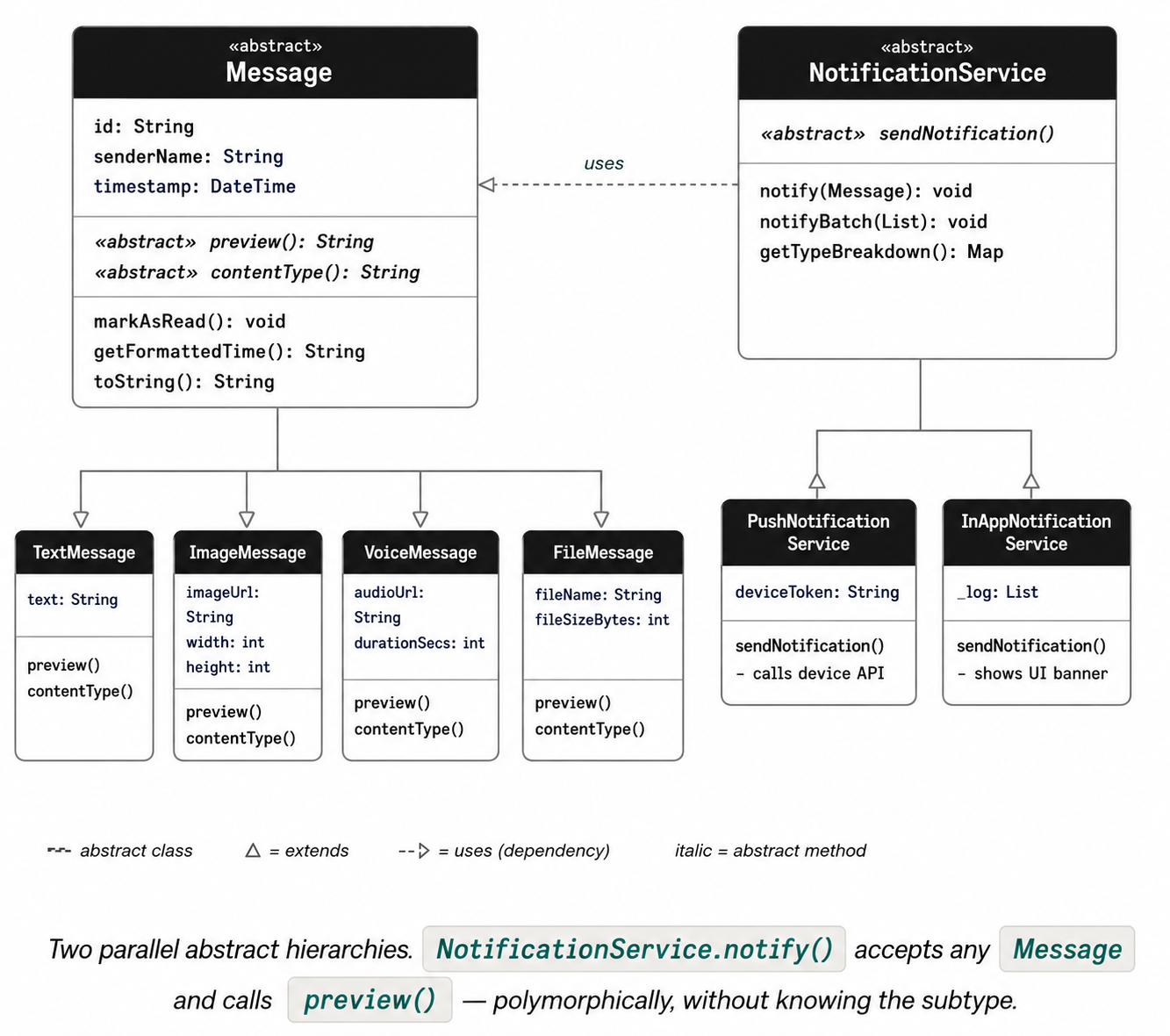
Two parallel abstract hierarchies. NotificationService.notify() accepts any Message and calls preview() — polymorphically, without knowing the subtype.
11. Exercises
Exercise 1 — Abstract shapes
Create an abstract class Shape with two abstract methods: double area() and double perimeter(), plus a concrete method String describe() that returns a formatted string using both. Implement three concrete subclasses: Circle, Rectangle, and Triangle (use Heron’s formula for the triangle’s area). Create a List<Shape> with several of each type, then write a function Shape largest(List<Shape> shapes) that finds and returns the one with the greatest area — using only the Shape type, no is-checks.
Exercise 2 — Add a ReactionMessage
Add a fifth message type to the chat app: ReactionMessage. It should extend the abstract Message and add an emoji field (String) and a reactedToMessageId field (String). Implement both required abstract methods — preview() should return something like 'Reacted with :)' and contentType() should return 'reaction'. Then add a ReactionMessage to the conversation list in main() and verify that all notification services handle it correctly without any modification to NotificationService.
Exercise 3 — A log-based NotificationService
Create a third concrete NotificationService called SilentLogService. Instead of sending any real notification, it writes every notification to an internal List<Map<String, String>> log (storing the title and body). Add a method printSummary() that prints how many notifications were logged grouped by the first word of the title (the sender name). Then write a helper function void notifyAll(List<NotificationService> services, Message msg) that dispatches a single message to multiple services — demonstrating polymorphism at both the Message and NotificationService levels simultaneously.