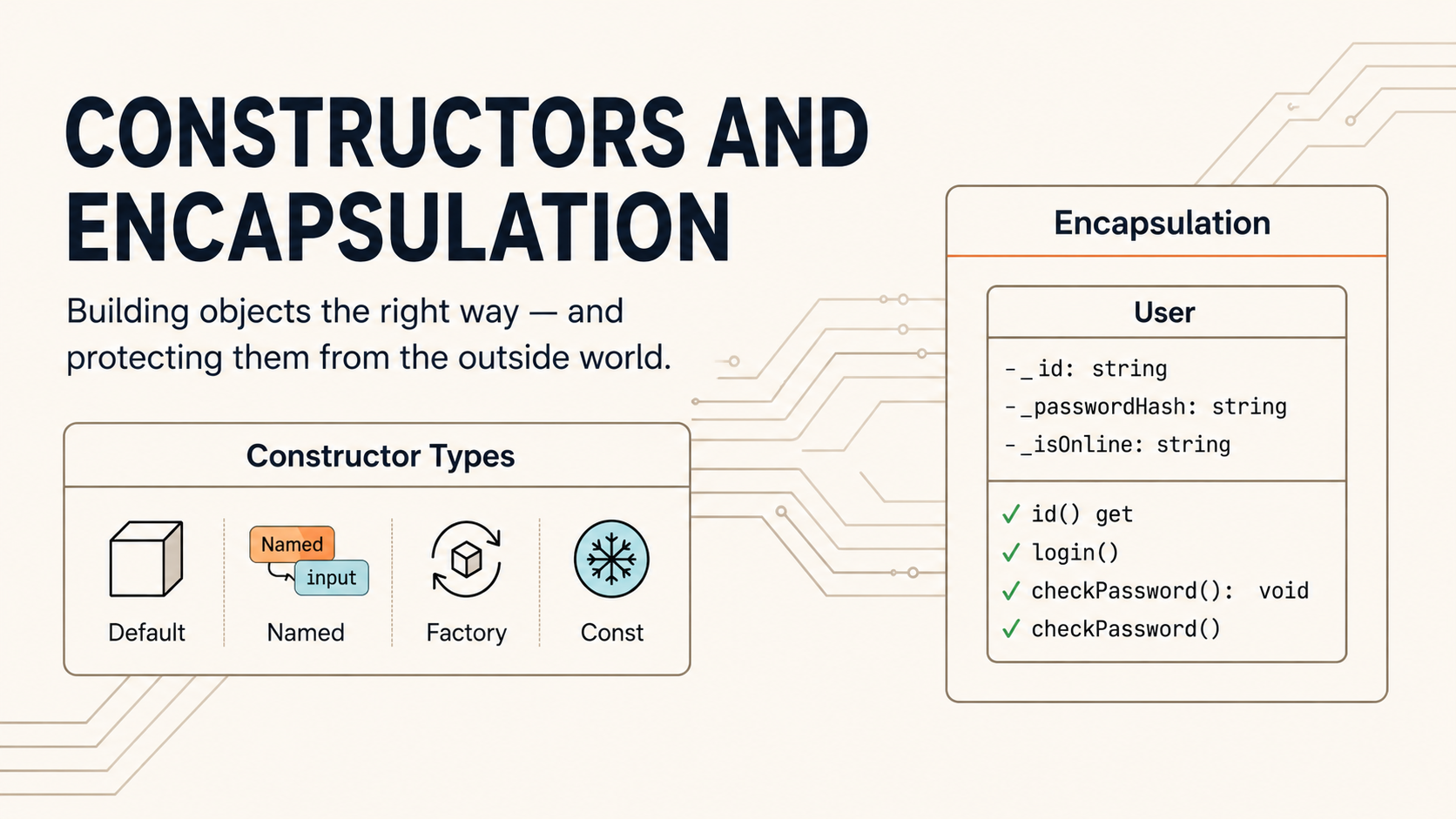
A well-designed class is like a well-designed API: it shows you exactly what you can do and hides everything you shouldn’t touch. This article teaches you two of the most powerful tools for achieving that: rich constructors that give objects life in multiple ways, and encapsulation that keeps their internal state safe. We’ll use both to build the User class — the second pillar of our chat application.
1. The four pillars of OOP — where we are
Object-Oriented Programming is built on four foundational ideas. Over the course of this series, we’ll cover all of them. Here’s where Article 2 sits in that journey:

Encapsulation is the first pillar we tackle in depth, and it’s arguably the most immediately practical. It’s what separates a well-designed class from a loose bag of variables.
2. The four constructor types in Dart
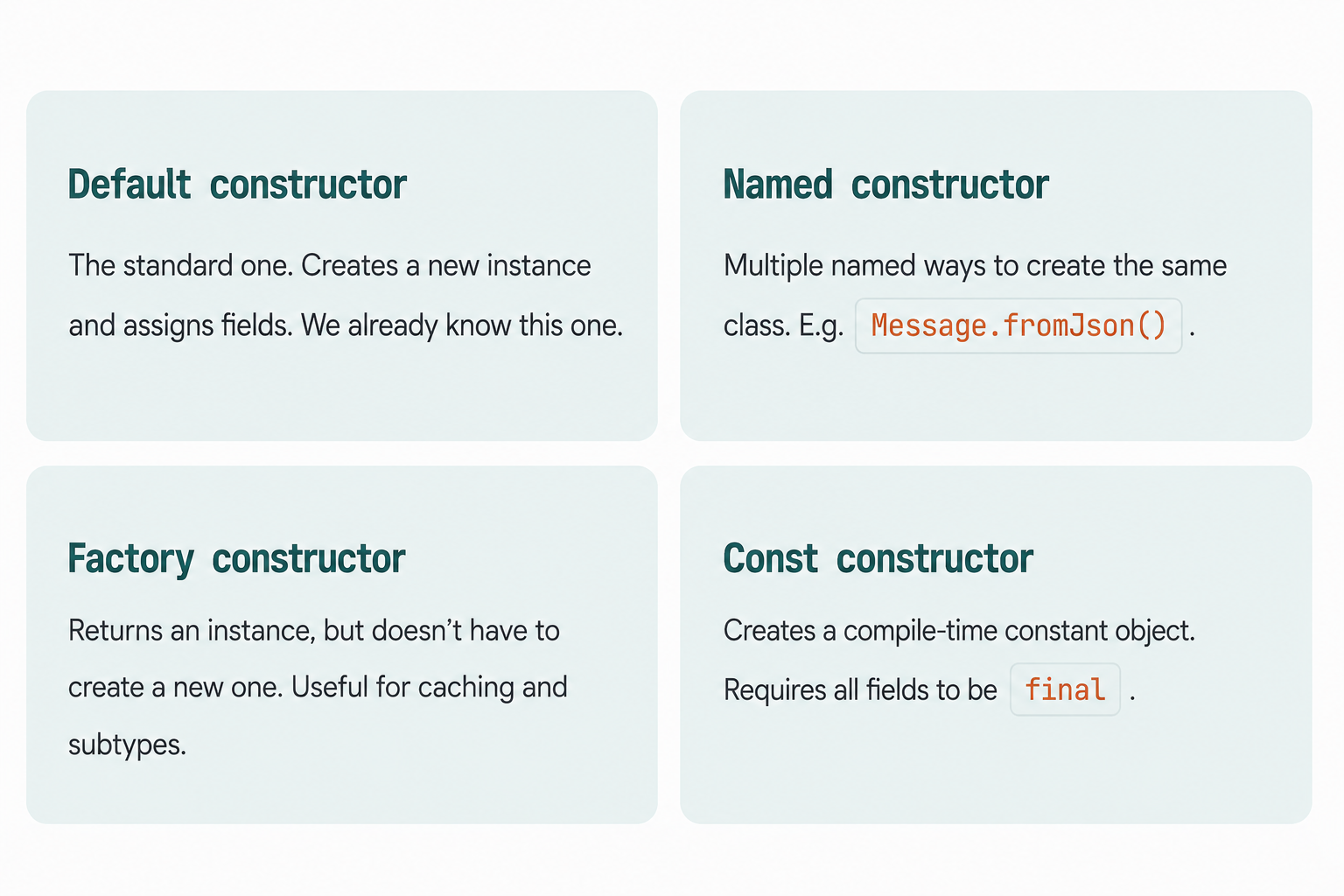
In Article 1 we used one type of constructor — the default positional or named-parameter constructor. Dart actually has four distinct constructor forms, each solving a different problem:
3. Named constructors
Sometimes there are several natural ways to create an object. Consider a DateTime — you might want to create one from a timestamp integer, from a formatted string, or representing “right now”. A single constructor can’t cleanly express all of these, so Dart lets you define named constructors.
The syntax is the class name, a dot, and then the constructor name:
class Temperature {
  final double celsius;

  // Default constructor — create from Celsius
  Temperature(this.celsius);

  // Named constructor — create from Fahrenheit
  Temperature.fromFahrenheit(double fahrenheit)
      : celsius = (fahrenheit - 32) * 5 / 9;

  // Named constructor — create from Kelvin
  Temperature.fromKelvin(double kelvin)
      : celsius = kelvin - 273.15;

  // Named constructor — a convenient constant
  Temperature.absoluteZero() : celsius = -273.15;

  @override
  String toString() => '${celsius.toStringAsFixed(1)}°C';
}
Now you can create a Temperature object in multiple, readable ways:
void main() {
  final t1 = Temperature(100);                  // 100.0°C
  final t2 = Temperature.fromFahrenheit(212);  // 100.0°C
  final t3 = Temperature.fromKelvin(373.15);  // 100.0°C
  final t4 = Temperature.absoluteZero();       // -273.2°C

  print(t1); // 100.0°C
  print(t2); // 100.0°C
  print(t4); // -273.2°C
}
The initialiser list
Notice the : celsius = ... syntax on the named constructors above. This is called an initialiser list. It runs before the constructor body and is the correct place to set final fields, call super() (more on that in Article 3), or run assertions. It’s separated from the constructor signature by a colon.
When to use named constructors
Use a named constructor whenever there are multiple semantically different ways to create the same object — especially when the inputs require a conversion or calculation before being stored. The name makes the intent crystal-clear at the call site.
Applied to our chat app: Message.fromJson()
In a real chat application, messages often arrive as JSON data from a server. A named constructor is the idiomatic Dart way to handle this:
class Message {
  final String id;
  final String text;
  final String senderName;
  final DateTime timestamp;
  bool isRead;

  // Default constructor
  Message({
    required this.id,
    required this.text,
    required this.senderName,
    required this.timestamp,
    this.isRead = false,
  });

  // Named constructor — builds a Message from a JSON map
  Message.fromJson(Map<String, dynamic> json)
      : id = json['id'] as String,
        text = json['text'] as String,
        senderName = json['sender_name'] as String,
        timestamp = DateTime.parse(json['timestamp'] as String),
        isRead = json['is_read'] as bool? ?? false;

  // Named constructor — a system message (no sender)
  Message.system(String text)
      : id = 'sys_${DateTime.now().millisecondsSinceEpoch}',
        text = text,
        senderName = 'System',
        timestamp = DateTime.now(),
        isRead = true;

  // Convert to a JSON map (the reverse of fromJson)
  Map<String, dynamic> toJson() => {
    'id': id,
    'text': text,
    'sender_name': senderName,
    'timestamp': timestamp.toIso8601String(),
    'is_read': isRead,
  };

  void markAsRead() => isRead = true;

  String getFormattedTime() {
    String h = timestamp.hour.toString().padLeft(2, '0');
    String m = timestamp.minute.toString().padLeft(2, '0');
    return '$h:$m';
  }

  @override
  String toString() => '[${getFormattedTime()}] $senderName: $text';
}
void main() {
  // Simulating data arriving from a server
  final serverData = {
    'id': 'msg_042',
    'text': 'Where are you?',
    'sender_name': 'Alice',
    'timestamp': '2024-01-15T19:05:00',
    'is_read': false,
  };

  final msg = Message.fromJson(serverData);
  print(msg); // [19:05] Alice: Where are you?

  // System message — no sender required
  final welcome = Message.system('Alice joined the chat.');
  print(welcome); // [19:05] System: Alice joined the chat.
}
4. Factory constructors
A factory constructor is declared with the factory keyword. It looks like a constructor but behaves more like a static method — it must return an instance of the class, but it doesn’t have to create a new one every time. This is powerful for two common patterns:
Pattern 1 — Returning a cached/shared instance (the Singleton pattern, which we’ll explore fully in Article 7). The idea is that only one instance of a class ever exists:
class AppConfig {
  final String apiBaseUrl;
  final int timeoutSeconds;

  // Private constructor — no one outside this class can call it
  AppConfig._(this.apiBaseUrl, this.timeoutSeconds);

  // The single shared instance, stored privately
  static final AppConfig _instance = AppConfig._(
    'https://api.chatapp.dev',
    30,
  );

  // Factory constructor — always returns the same instance
  factory AppConfig() => _instance;
}

void main() {
  final config1 = AppConfig();
  final config2 = AppConfig();

  print(identical(config1, config2)); // true — same object in memory
  print(config1.apiBaseUrl);         // https://api.chatapp.dev
}
Pattern 2 — Returning a subtype based on input. A factory can inspect its arguments and return different concrete types, without the caller needing to know which one. We’ll use this heavily in Article 7 (the Factory design pattern). Here’s a preview:
abstract class Shape {
  double area();

  // Factory that returns different Shape subtypes
  factory Shape.fromType(String type, List<double> params) {
    switch (type) {
      case 'circle':   return Circle(params[0]);
      case 'rectangle': return Rectangle(params[0], params[1]);
      default: throw ArgumentError('Unknown shape: $type');
    }
  }
}
A factory constructor cannot use this to initialize fields directly — it must explicitly return an instance. Use it when you need logic to decide which instance to return, not just how to fill in the fields.
5. Const constructors
If every field in your class is final and every value can be known at compile time, you can mark your constructor const. Dart will then treat objects created with const as compile-time constants — identical const objects with the same arguments share the exact same spot in memory.
class Color {
  final int r;
  final int g;
  final int b;

  // All fields are final → we can make this const
  const Color(this.r, this.g, this.b);

  // Const named constructors for common colours
  static const Color red   = Color(255, 0, 0);
  static const Color green = Color(0, 255, 0);
  static const Color blue  = Color(0, 0, 255);
}

void main() {
  const c1 = Color(255, 0, 0);
  const c2 = Color(255, 0, 0);

  print(identical(c1, c2)); // true — same object, Dart reuses it

  // You can still use new without const (just won't be canonicalised)
  final c3 = Color(255, 0, 0);
  print(identical(c1, c3)); // false — different objects
}
For a constructor to be const, all fields must be final, and all values provided to it must themselves be compile-time constants. You cannot use DateTime.now() in a const constructor, for example.
In Flutter, const constructors are used extensively for widgets that never change (like const Text('Hello')). Dart skips rebuilding objects it already has in memory — a meaningful performance gain in large widget trees.
6. Encapsulation — the problem it solves
Now for the second major topic of this article. Let’s start with a concrete problem.
Suppose we have a BankAccount class with a balance field. If the field is public, anyone can do this:
❌ Without encapsulation
class BankAccount {
  double balance;

  BankAccount(this.balance);
}

void main() {
  final acct = BankAccount(100);

  // Anyone can do this
  acct.balance = -99999;
  acct.balance = double.infinity;
}
✅ With encapsulation
class BankAccount {
  double _balance;

  BankAccount(this._balance);

  double get balance => _balance;

  void deposit(double amount) {
    if (amount > 0) _balance += amount;
  }

  void withdraw(double amount) {
    if (amount > 0 && amount <= _balance) {
      _balance -= amount;
    }
  }
}
The version on the right makes it impossible to put the account into an invalid state. You can read the balance, but you can only change it by going through deposit() or withdraw() — methods that enforce the rules. This is what encapsulation means: the object owns its own data and controls how it changes.
Core idea
Encapsulation bundles data (fields) and the rules for changing that data (methods) into one unit. It prevents outside code from putting an object into an inconsistent or invalid state.
7. Private fields with _
In Dart, making a member private is remarkably simple: prefix its name with an underscore _. There is no private keyword.
class Counter {
  int _count = 0;   // private — only accessible inside this file
  int id;           // public — accessible anywhere

  Counter(this.id);

  void increment() => _count++;
  void reset()     => _count = 0;
  int get count   => _count;
}
Important — Dart privacy is library-level, not class-level
Unlike Java or C#, Dart’s _ prefix makes a member private to the file (technically the Dart “library”), not just to the class. This means that if two classes are defined in the same .dart file, they can access each other’s _ members. In practice, one class per file is standard Dart style, so this rarely causes confusion.
Private constructors
You can also make a constructor private. This is useful when you want to prevent direct instantiation — forcing callers to go through a factory or static method instead:
class Logger {
  // Private constructor — can't do Logger() from outside
  Logger._();

  static final Logger _instance = Logger._();

  factory Logger() => _instance;

  void log(String message) => print('[LOG] $message');
}
8. Getters and setters
A getter is a special method that lets you expose a value using field-like syntax but run code behind the scenes. A setter does the same for writing. They are the bridge between private fields and a clean public interface.
Getters
Getters use the get keyword, have no parameter list, and return a value. From the outside, they look exactly like reading a field:
class Person {
  final String _firstName;
  final String _lastName;
  final DateTime _birthDate;

  Person(this._firstName, this._lastName, this._birthDate);

  // Getter: combines two private fields into one computed value
  String get fullName => '$_firstName $_lastName';

  // Getter: computes age from birth date — no stored field needed
  int get age {
    final today = DateTime.now();
    int age = today.year - _birthDate.year;
    if (today.month < _birthDate.month ||
        (today.month == _birthDate.month && today.day < _birthDate.day)) {
      age--;
    }
    return age;
  }
}

void main() {
  final alice = Person('Alice', 'Smith', DateTime(1995, 6, 20));

  // Getters look like field access — no () needed
  print(alice.fullName); // Alice Smith
  print(alice.age);      // (calculated from today's date)
}
Notice that age doesn’t need to be stored as a field — it’s calculated fresh each time the getter is called. This is one of the most useful things about getters: they can derive values from existing data without redundant storage.
Setters
Setters use the set keyword and take exactly one parameter. They let you intercept writes and validate or transform the value:
class UserProfile {
  String _username;
  int _age;

  UserProfile(this._username, this._age);

  // Getter — read-only access to the raw field
  String get username => _username;

  // Setter — intercepts writes; enforces a minimum length
  set username(String value) {
    if (value.length < 3) {
      throw ArgumentError('Username must be at least 3 characters.');
    }
    // Normalise to lowercase
    _username = value.toLowerCase();
  }

  int get age => _age;

  // Setter — only allows valid ages
  set age(int value) {
    if (value < 0 || value > 150) {
      throw RangeError('Age must be between 0 and 150.');
    }
    _age = value;
  }
}

void main() {
  final profile = UserProfile('Alice', 28);

  // Setter syntax looks like direct field assignment
  profile.username = 'ALICE_NEW';
  print(profile.username); // alice_new (lowercased)

  // This would throw ArgumentError:
  // profile.username = 'ab';

  // This would throw RangeError:
  // profile.age = -5;
}
Getter without a setter = read-only
If you define a getter but no corresponding setter, the property is effectively read-only from outside the class. This is a very common pattern for fields you want to expose but not allow external code to change directly.
When to use getters vs plain methods
Both getters and methods can return computed values. The convention in Dart is:
Use a getter when the value feels like a property of the object — something it logically has, like fullName, age, or isEmpty. The computation should be lightweight and have no side effects.
Use a method when the computation is expensive, has side effects, requires parameters, or represents an action — like fetchMessages(), compress(quality), or markAsRead().
9. Building our chat app: the User model
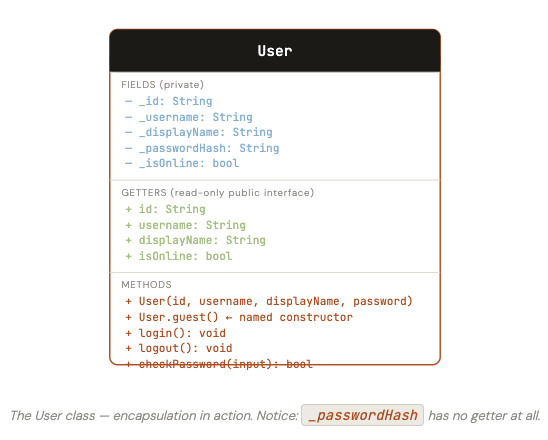
Now let’s put everything together. Our chat application needs a User class. Here’s what we need it to do:
A user has an ID, a username, a display name, and an online status. The ID should never be changeable after creation. The username should be read-only from outside (only an admin operation should be able to change it, and we’ll enforce that). The online status should only be togglable through explicit login() and logout() calls — not through direct field assignment. And the password must never be readable at all, only checkable.
Step 1 — Class diagram
Step 2 — Implementation
// In a real app you'd use a proper hashing library.
// For learning, we use a simple simulation.
String _hashPassword(String password) {
  // Simulated hash — never do this in production!
  return 'hashed_$password';
}

class User {
  // ── Private fields ────────────────────────────────
  final String _id;
  String _username;
  String _displayName;
  String _passwordHash;
  bool _isOnline;
  DateTime? _lastSeenAt;

  // ── Default constructor ───────────────────────────
  User({
    required String id,
    required String username,
    required String displayName,
    required String password,
  })  : _id = id,
        _username = username,
        _displayName = displayName,
        _passwordHash = _hashPassword(password),
        _isOnline = false,
        _lastSeenAt = null;

  // ── Named constructor — creates a guest user ──────
  User.guest()
      : _id = 'guest',
        _username = 'guest',
        _displayName = 'Guest',
        _passwordHash = '',
        _isOnline = false,
        _lastSeenAt = null;

  // ── Getters (public read-only interface) ──────────
  String get id          => _id;
  String get username    => _username;
  String get displayName => _displayName;
  bool   get isOnline    => _isOnline;
  bool   get isGuest     => _id == 'guest';

  // Computed getter — returns a formatted last-seen string
  String get lastSeen {
    if (_isOnline) return 'Online';
    if (_lastSeenAt == null) return 'Never';
    final diff = DateTime.now().difference(_lastSeenAt!);
    if (diff.inMinutes < 60) return '${diff.inMinutes}m ago';
    if (diff.inHours   < 24) return '${diff.inHours}h ago';
    return '${diff.inDays}d ago';
  }

  // ── Setter with validation ────────────────────────
  set displayName(String value) {
    final trimmed = value.trim();
    if (trimmed.isEmpty) {
      throw ArgumentError('Display name cannot be empty.');
    }
    _displayName = trimmed;
  }

  // ── Methods ───────────────────────────────────────

  /// Marks the user as online. Would normally trigger notifications.
  void login() {
    if (isGuest) throw StateError('Guest users cannot log in.');
    _isOnline = true;
    print('$_displayName is now online.');
  }

  /// Marks the user as offline and records the time.
  void logout() {
    _isOnline = false;
    _lastSeenAt = DateTime.now();
    print('$_displayName went offline.');
  }

  /// Returns true if the provided password matches.
  /// Note: _passwordHash is never returned directly.
  bool checkPassword(String input) {
    return _hashPassword(input) == _passwordHash;
  }

  @override
  String toString() => 'User($_username, ${_isOnline ? "online" : "offline"})';
}
Step 3 — Using the User class
void main() {
  // Create a real user
  final alice = User(
    id: 'usr_001',
    username: 'alice',
    displayName: 'Alice Smith',
    password: 's3cur3p@ss',
  );

  // Create a guest user via named constructor
  final guest = User.guest();

  // Read via getters — looks like field access
  print(alice.username);     // alice
  print(alice.isOnline);     // false
  print(alice.lastSeen);     // Never

  // Log in — only method can change online status
  alice.login();              // Alice Smith is now online.
  print(alice.isOnline);     // true
  print(alice.lastSeen);     // Online

  // Password check — the hash is never exposed
  print(alice.checkPassword('s3cur3p@ss'));  // true
  print(alice.checkPassword('wrongpass'));   // false

  // Setter with validation
  alice.displayName = 'Alice Johnson';
  print(alice.displayName); // Alice Johnson

  // This would throw ArgumentError — encapsulation at work!
  // alice.displayName = '   '; // throws: Display name cannot be empty.

  // This would be a compile error — _isOnline is private
  // alice._isOnline = true; // ERROR: '_isOnline' isn't defined

  // Guest can't log in
  // guest.login(); // throws: Guest users cannot log in.

  alice.logout();            // Alice Johnson went offline.
  print(alice.lastSeen);     // 0m ago
}
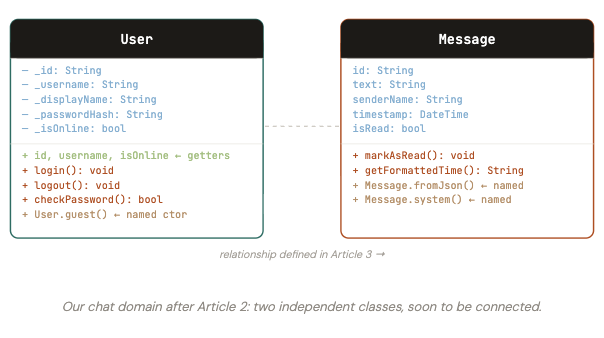
Visualising the two-class system so far
After Articles 1 and 2, our chat app has two classes. They don’t yet have a formal relationship, but we can already see them side-by-side:
10. Exercises
Three exercises to reinforce this article’s concepts:
Exercise 1 — Multiple constructors
Create a Rectangle class with width and height fields. Add four constructors: a default one taking width and height, a named Rectangle.square(side) that creates a square, a named Rectangle.fromArea(area, aspectRatio) that calculates width and height from the total area and an aspect ratio (e.g. 16/9), and a const version of the square constructor. Add getters for area, perimeter, and isSquare.
Exercise 2 — Encapsulate a shopping cart
Create a ShoppingCart class where the internal list of items is private. Expose its itemCount and totalPrice as read-only getters. Add methods addItem(name, price) and removeItem(name) that validate their inputs (no empty names, no negative prices, can’t remove an item that isn’t there). Make the cart impossible to put into an invalid state from outside code.
Exercise 3 — Improve the User model
Extend the User class from this article. Add a private _messageCount field and a getter for it. Add a method recordMessage() that increments the count — but only when the user is online (throw a StateError if they’re not). Add a factory constructor User.fromJson(Map json) that builds a user from a server response (assume the JSON contains id, username, display_name — no password in the response, so use a sentinel value like an empty string for the hash).