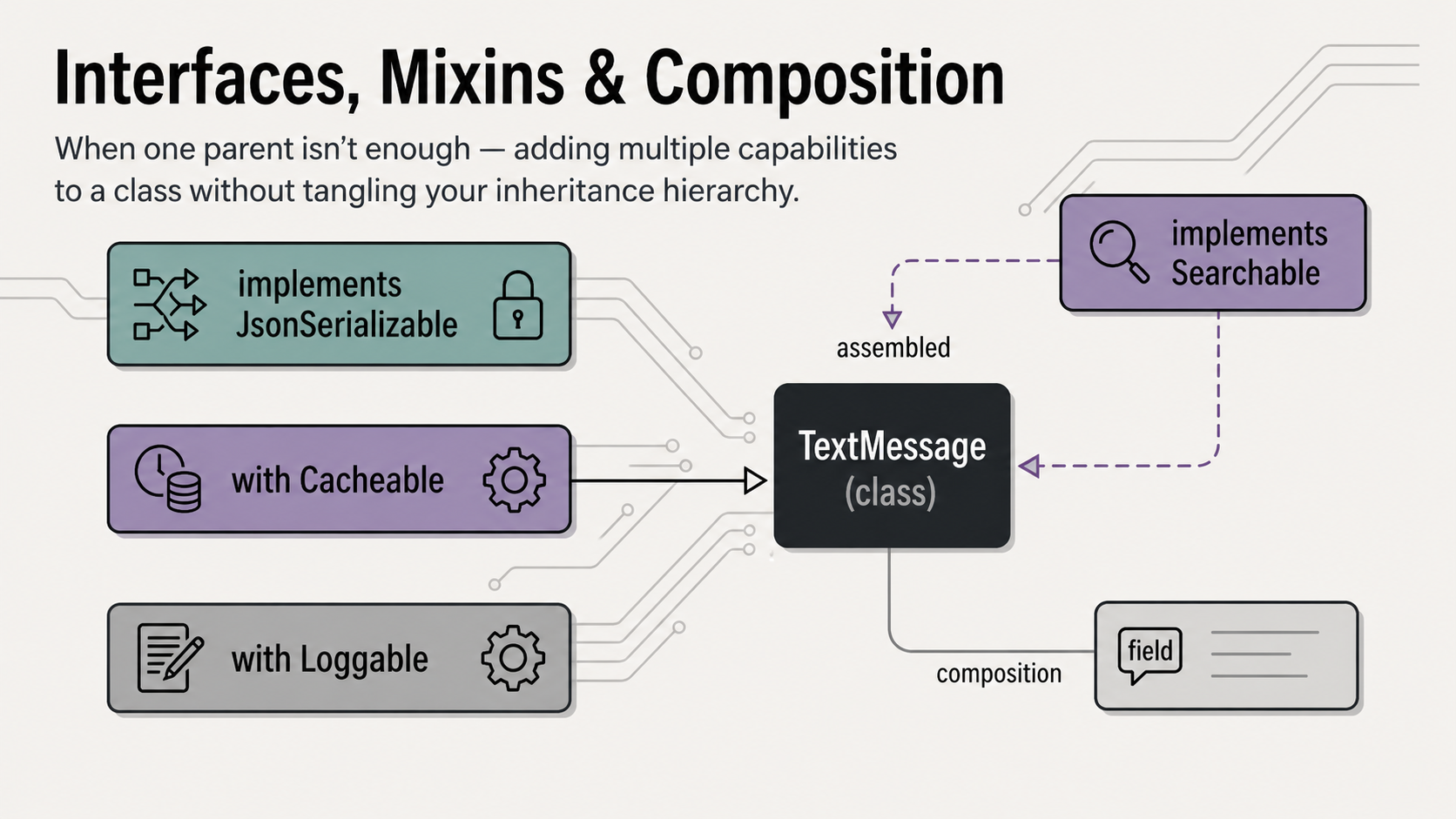
Dart’s approach to multiple capabilities is one of its most elegant features — and one of the biggest surprises for developers coming from Java or C#. Through implicit interfaces, mixins, and composition, Dart gives you surgical control over what a class is, what it can do, and what it contains — without the tangled hierarchies that plague languages with only single inheritance.
1. The four pillars — completing the set

Abstraction — hiding how something works behind what it does — is the final pillar. Interfaces are abstraction’s purest form: a contract with no implementation at all, just a list of capabilities a class promises to provide. This article completes the four pillars and introduces two uniquely Dart features — implicit interfaces and mixins — that make the language’s OOP model especially expressive.
2. The multiple-capability problem
Consider what a fully-featured TextMessage in a production chat app needs to do:
It needs to be a Message — so it fits into the message hierarchy. It needs to be Serializable — so it can be saved to a database and sent over the network. It needs to be Cacheable — so it can be stored locally and retrieved instantly. And it needs to be Searchable — so users can find it by keyword.
Each of these is a distinct capability. They don’t naturally form a single hierarchy. And Dart (like Java) does not allow extends to be used with more than one class:
// ❌ Dart does not allow multiple inheritance via extends
class TextMessage extends Message, Serializable, Cacheable {
  // Compile error: only one superclass allowed
}
The solution is Dart’s two complementary mechanisms: implements for declaring what a class promises to do, and mixin + with for sharing how to do it across unrelated classes. Let’s learn each one.
3. Dart’s implicit interfaces
Here is Dart’s first surprise for developers coming from Java or C#: there is no interface keyword in Dart.
Instead, every class in Dart automatically defines an interface. The interface of a class is simply the set of all its public methods and getters — the contract it exposes, stripped of any implementation. Any other class can implement that implicit interface and is then required to provide its own concrete implementation of every member.
// serializable.dart
// A regular class — but it also implicitly defines an interface
class Serializable {
  Map<String, dynamic> toJson() => {};
}

// Using Serializable as an interface via 'implements'
class Product implements Serializable {
  final String name;
  final double price;

  Product(this.name, this.price);

  // Must provide our own implementation — even though Serializable had one
  @override
  Map<String, dynamic> toJson() => {
    'name': name,
    'price': price,
  };
}
Notice the crucial rule: when you implement a class, you get none of its implementation. Even though Serializable had a body for toJson(), Product must write its own version. The implements relationship is purely a contract — a type promise. It gives you no free code.
Best practice: use abstract classes as interfaces
In Dart, the idiomatic way to define a pure interface (a contract with no implementation) is to use an abstract class with only abstract methods. This clearly communicates intent: “this class exists only to be implemented, never to be extended for shared behaviour.”
// Idiomatic Dart — abstract class as interface
abstract class Serializable {
  Map<String, dynamic> toJson();
}

abstract class Searchable {
  bool matches(String query);
  List<String> getSearchTokens();
}

abstract class Cacheable {
  String get cacheKey;
  Duration get cacheDuration;
}
4. The implements keyword
The implements keyword places a class under a contract. A class can implement multiple interfaces, separated by commas — with no limit.
// document.dart
abstract class Serializable {
  Map<String, dynamic> toJson();
}

abstract class Searchable {
  bool matches(String query);
  List<String> getSearchTokens();
}

abstract class Printable {
  String toPrintFormat();
}

// Document satisfies THREE contracts simultaneously
class Document implements Serializable, Searchable, Printable {
  final String title;
  final String body;

  Document(this.title, this.body);

  // Must implement ALL methods from ALL interfaces
  @override
  Map<String, dynamic> toJson() => {'title': title, 'body': body};

  @override
  bool matches(String query) =>
      title.toLowerCase().contains(query.toLowerCase()) ||
      body.toLowerCase().contains(query.toLowerCase());

  @override
  List<String> getSearchTokens() => [
    ...title.split(' '),
    ...body.split(' '),
  ];

  @override
  String toPrintFormat() => '=== $title ===\n$body';
}

void main() {
  final doc = Document('Dart OOP Guide', 'Interfaces are powerful...');

  // Document can be used as any of its interface types
  Serializable s = doc;
  Searchable   q = doc;
  Printable    p = doc;

  print(s.toJson());
  print(q.matches('interfaces')); // true
  print(p.toPrintFormat());
}
This is the power of implements: a single object can be passed to a function expecting Serializable, and another expecting Searchable, and another expecting Printable — all at the same time. It satisfies all three contracts simultaneously.
5. extends vs. implements — the key distinction
extends
class Dog extends Animal {
  // Gets Animal's fields for free
  // Gets Animal's methods for free
  // Can call super.method()
  // Can only extend ONE class
  // IS-A relationship: Dog is an Animal

  // Only needs to add/override
  // what's different
  void bark() => print('Woof!');
}
implements
class Robot implements Animal {
  // Gets NOTHING from Animal
  // Must rewrite every single member
  // Cannot call super
  // Can implement MANY interfaces
  // CAN-DO relationship: Robot can act like Animal

  // Must implement ALL of Animal's
  // public members from scratch
  @override
  String name = 'RoboDog';
  @override
  void breathe() => print('*whirr*');
}
The mental model is simple: extends is an is-a relationship that gives you free implementation. implements is a can-do or behaves-like relationship that gives you only a contract. A Robot is not an Animal, but it can be made to behave like one by implementing the same interface.
The rule of thumb
Ask: “do I want to inherit implementation from this class?” If yes, use extends. If you only want to declare a type relationship or satisfy a contract — and you’ll write your own implementation — use implements.
6. Mixins — reusable behaviour without inheritance
Here is the problem that implements alone cannot solve: if ten message types all need to be Serializable, and the serialisation logic is identical for all of them, every class still has to write its own implementation. That’s duplication — and duplication is exactly what we’ve been working to eliminate.
Enter mixins. A mixin is a bundle of methods and fields designed to be mixed into a class using the with keyword. Unlike inheritance, a mixin does not create a parent-child relationship. And unlike implements, a mixin does provide implementation — it contributes real, reusable code to any class it’s mixed into.
// loggable.dart
// Declare a mixin with the 'mixin' keyword
mixin Loggable {
  final List<String> _logs = [];

  void log(String message) {
    final entry = '[${DateTime.now().toIso8601String()}] $message';
    _logs.add(entry);
  }

  List<String> get logs => List.unmodifiable(_logs);

  void clearLogs() => _logs.clear();
}

// Mix into ANY class — no shared parent needed
class TextMessage extends Message with Loggable {
  final String text;
  // ... constructor and overrides ...
}

class User with Loggable {
  final String username;
  User(this.username);
}

class ApiService with Loggable {
  void fetchMessages() {
    log('Fetching messages from server...');
    // ... http call ...
    log('Messages fetched successfully.');
  }
}

void main() {
  final user = User('alice');
  user.log('User logged in.');
  user.log('User sent a message.');
  print(user.logs); // two log entries

  final api = ApiService();
  api.fetchMessages();
  print(api.logs); // two log entries
}
User and ApiService have no common parent — they share no inheritance chain. But they both have full logging capability because they both mix in Loggable. This is horizontal code reuse: sharing behaviour across unrelated classes, which inheritance alone cannot do.
The key insight
Inheritance shares behaviour vertically — down a parent-child chain. Mixins share behaviour horizontally — across completely unrelated classes. These two mechanisms complement each other, and together they eliminate almost all need for code duplication.
Mixins can have state
Unlike interfaces, mixins can carry fields as well as methods. This means a mixin can maintain its own internal state, which gets added to every class it’s mixed into:
mixin Cacheable {
  // These fields are added to every class that uses this mixin
  DateTime? _cachedAt;
  static final Duration _defaultTtl = const Duration(minutes: 5);

  DateTime? get cachedAt => _cachedAt;

  bool get isCacheValid {
    if (_cachedAt == null) return false;
    return DateTime.now().difference(_cachedAt!) < _defaultTtl;
  }

  void markCached() => _cachedAt = DateTime.now();

  void invalidateCache() => _cachedAt = null;
}
Multiple mixins on one class
You can apply several mixins to a single class. They are listed after with, separated by commas:
// extends gives us the parent chain
// with gives us multiple horizontal capabilities
// implements declares additional type contracts
class TextMessage extends Message
    with Loggable, Cacheable
    implements Searchable {

  final String text;

  // ... constructor ...

  // From Loggable: log(), logs, clearLogs() — FREE
  // From Cacheable: markCached(), isCacheValid — FREE
  // From Searchable: must implement ourselves (it's an interface)
  @override
  bool matches(String query) =>
      text.toLowerCase().contains(query.toLowerCase());

  @override
  List<String> getSearchTokens() => text.split(' ');
}
7. The on clause — restricting mixin usage
Sometimes a mixin only makes sense when applied to a specific class or its subclasses. The on keyword restricts which classes a mixin can be mixed into — and in doing so, grants the mixin access to the host class’s members.
dart
abstract class Message {
  String get id;
  String get senderName;
  DateTime get timestamp;
  void markAsRead();
}

// This mixin can ONLY be used on Message (or its subclasses)
mixin MessageAnalytics on Message {
  int _viewCount = 0;

  // Can access Message's members because of the 'on' clause
  void recordView() {
    _viewCount++;
    // 'id' and 'senderName' come from Message — guaranteed by 'on'
    print('Message $id from $senderName: view #$_viewCount');
    if (_viewCount == 1) markAsRead(); // also from Message
  }

  int get viewCount => _viewCount;
}

// ✅ TextMessage extends Message, so can use MessageAnalytics
class TextMessage extends Message with MessageAnalytics {
  // ...
}

// ❌ User does NOT extend Message — compile error!
// class User with MessageAnalytics { ... }
When to use on
Use the on clause when your mixin needs to call methods or access fields from a specific base class. Without on, the mixin has no knowledge of its host class. With on, it gains full access — but can only be applied to classes in that hierarchy.
8. Mixin linearisation order
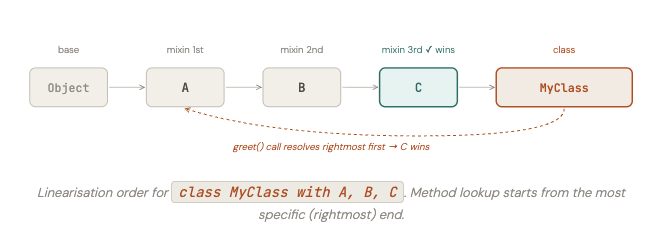
When multiple mixins are applied to a class, they are processed in order from left to right, each one layered on top of the previous. If two mixins define the same method, the rightmost one wins. This ordering is called mixin linearisation.
dart
mixin A {
  String greet() => 'Hello from A';
}

mixin B {
  String greet() => 'Hello from B';
}

mixin C {
  String greet() => 'Hello from C';
}

class MyClass with A, B, C {}

void main() {
  print(MyClass().greet()); // Hello from C  ← rightmost wins
}
The effective class hierarchy after linearisation is: Object → A → B → C → MyClass. When greet() is called, Dart walks this chain from the right (most specific) end and finds C‘s implementation first.
Order matters
The order of mixins in a with clause is significant. If you have with Logger, DetailedLogger, DetailedLogger‘s methods take precedence over Logger‘s. Always list mixins from most general to most specific.
9. Composition — when to use a field instead
Inheritance and mixins are not always the right tool. Sometimes the simplest and most flexible approach is to give a class a field that holds another object, and delegate to it. This is called composition, and it follows the principle “favour composition over inheritance”.
// chat_room.dart
// ❌ Wrong: ChatRoom does NOT "extend" a list — it HAS one
// class ChatRoom extends List<Message> { ... } // never do this

// ✅ Correct: ChatRoom HAS-A list of messages (composition)
class ChatRoom {
  final String id;
  final String name;
  final List<User> _members = [];
  final List<Message> _messages = [];

  ChatRoom({required this.id, required this.name});

  // Delegates to the internal list — but with controlled access
  void addMessage(Message message) => _messages.add(message);

  void addMember(User user) {
    if (!_members.contains(user)) _members.add(user);
  }

  List<Message> get messages => List.unmodifiable(_messages);
  List<User>    get members  => List.unmodifiable(_members);
  int           get messageCount => _messages.length;

  List<Message> getUnread() =>
      _messages.where((m) => !m.isRead).toList();

  List<Message> search(String query) =>
      _messages
          .whereType<Searchable>()
          .where((m) => m.matches(query))
          .cast<Message>()
          .toList();
}
ChatRoom has messages; it is not a kind of message. ChatRoom has members; it is not a kind of user. Composition captures this naturally — and crucially, it keeps ChatRoom in full control of how its internal collections are accessed and mutated.
10. Decision guide: extends, implements, with, or field?
extends
Use when
Your class is a specialised kind of the parent. You want to inherit and possibly override its implementation. One parent only.
implements
Use when
You need to declare a type contract without inheriting code. Or you want a class to satisfy multiple type requirements simultaneously.
with (mixin)
Use when
You want to share a reusable bundle of code across classes that don’t share a parent. The mixin provides real implementation.
| Keyword | Inherits implementation? | Multiple allowed? | Creates parent-child? |
|---|---|---|---|
| extends | ✅ Yes — fields and methods | ❌ One only | ✅ Yes — IS-A |
| implements | ❌ No — contract only | ✅ Unlimited | CAN-DO only |
| with (mixin) | ✅ Yes — full methods + fields | ✅ Multiple | ❌ No hierarchy |
| field (composition) | Delegated as needed | ✅ Unlimited | ❌ HAS-A only |
11. Building our chat app: Serializable, Cacheable & Loggable
Let’s now add three real capabilities to our chat app using the techniques from this article. Each one will be implemented as a mixin so it can be shared across message types, users, and services without duplication.
The Serializable mixin
// serializable.dart
// Abstract interface — defines the contract
abstract class JsonSerializable {
  Map<String, dynamic> toJson();
  void validate();
}

// Mixin — provides the shared toJson base structure for messages
mixin MessageSerializable on Message implements JsonSerializable {
  // Provides common fields — subclasses call super.toJson() and extend it
  @override
  Map<String, dynamic> toJson() => {
    'id':          id,
    'sender_name': senderName,
    'timestamp':   timestamp.toIso8601String(),
    'is_read':     isRead,
    'content_type': contentType(),
  };

  @override
  void validate() {
    if (id.isEmpty) throw ArgumentError('Message id cannot be empty');
    if (senderName.isEmpty) throw ArgumentError('Sender name cannot be empty');
  }
}
The Cacheable mixin
// cacheable.dart
mixin Cacheable {
  DateTime? _cachedAt;
  static const Duration _ttl = Duration(minutes: 10);

  DateTime? get cachedAt     => _cachedAt;
  bool      get isCacheValid {
    if (_cachedAt == null) return false;
    return DateTime.now().difference(_cachedAt!) < _ttl;
  }

  void markCached()      => _cachedAt = DateTime.now();
  void invalidateCache() => _cachedAt = null;

  /// Subclasses may override to customise TTL per type
  Duration get cacheDuration => _ttl;
}
The Loggable mixin
// loggable.dart
mixin Loggable {
  final List<String> _logs = [];

  void log(String event) {
    final ts = DateTime.now();
    final h  = ts.hour.toString().padLeft(2, '0');
    final m  = ts.minute.toString().padLeft(2, '0');
    final s  = ts.second.toString().padLeft(2, '0');
    _logs.add('[$h:$m:$s] $event');
  }

  List<String> get logs       => List.unmodifiable(_logs);
  int           get logCount   => _logs.length;
  void          clearLogs()   => _logs.clear();

  void printLogs() {
    if (_logs.isEmpty) { print('No logs.'); return; }
    _logs.forEach(print);
  }
}
The Searchable interface
// searchable.dart
// Pure interface — no implementation, just a contract
abstract class Searchable {
  /// Returns true if this object matches the query
  bool matches(String query);

  /// Returns all indexable tokens for search indexing
  List<String> getSearchTokens();
}
Assembling TextMessage with all capabilities
// text_message.dart — fully assembled
class TextMessage extends Message
    with MessageSerializable, Cacheable, Loggable
    implements Searchable {

  final String text;

  TextMessage({
    required String id,
    required String senderName,
    required DateTime timestamp,
    required this.text,
    bool isRead = false,
  }) : super(id: id, senderName: senderName,
             timestamp: timestamp, isRead: isRead);

  // ── Required by abstract Message ────────────────
  @override
  String preview() =>
      text.length > 40 ? '${text.substring(0, 40)}...' : text;

  @override
  String contentType() => 'text';

  // ── Extended toJson — adds text-specific fields ──
  @override
  Map<String, dynamic> toJson() => {
    ...super.toJson(),   // base fields from MessageSerializable
    'text': text,       // text-specific field
  };

  // ── Required by Searchable interface ─────────────
  @override
  bool matches(String query) {
    final q = query.toLowerCase();
    return text.toLowerCase().contains(q) ||
           senderName.toLowerCase().contains(q);
  }

  @override
  List<String> getSearchTokens() => [
    ...text.split(' '),
    senderName,
  ];
}
Using it all together
// main.dart
void main() {
  final msg = TextMessage(
    id: 'msg_001',
    senderName: 'Alice',
    timestamp: DateTime.now(),
    text: 'Hey! Are you coming to the meeting tonight?',
  );

  // ── From abstract Message ─────────────────────────
  print(msg);               // [HH:MM] Alice: Hey! Are you coming to the meeti...
  print(msg.contentType()); // text

  // ── From MessageSerializable mixin ────────────────
  msg.validate();           // no throw — valid message
  print(msg.toJson());      // {id: msg_001, sender_name: Alice, text: Hey!...}

  // ── From Cacheable mixin ──────────────────────────
  print(msg.isCacheValid);  // false — not cached yet
  msg.markCached();
  print(msg.isCacheValid);  // true
  print(msg.cachedAt);      // DateTime

  // ── From Loggable mixin ───────────────────────────
  msg.log('Message displayed in chat list.');
  msg.log('Message tapped — opening detail view.');
  msg.markAsRead();
  msg.log('Message marked as read.');
  msg.printLogs();
  // [HH:MM:SS] Message displayed in chat list.
  // [HH:MM:SS] Message tapped — opening detail view.
  // [HH:MM:SS] Message marked as read.

  // ── From Searchable interface ─────────────────────
  print(msg.matches('meeting')); // true
  print(msg.matches('lunch'));   // false

  // ── Polymorphic usage ─────────────────────────────
  // The same object can be passed wherever any of its types are expected
  processMessage(msg);     // accepts Message
  cacheObject(msg);        // accepts Cacheable
  searchObject(msg, 'meeting'); // accepts Searchable

  // ── Loggable applied to a completely unrelated class ─
  print('\n── User also has Loggable ──');
  final user = User(id: 'usr_001', username: 'alice',
      displayName: 'Alice', password: 'pass');
  user.log('User logged in.');
  user.log('User sent a message.');
  user.printLogs();
}

void processMessage(Message m) =>
    print('Processing: ${m.preview()}');

void cacheObject(Cacheable c) =>
    print('Cache valid: ${c.isCacheValid}');

void searchObject(Searchable s, String q) =>
    print('Matches "$q": ${s.matches(q)}');
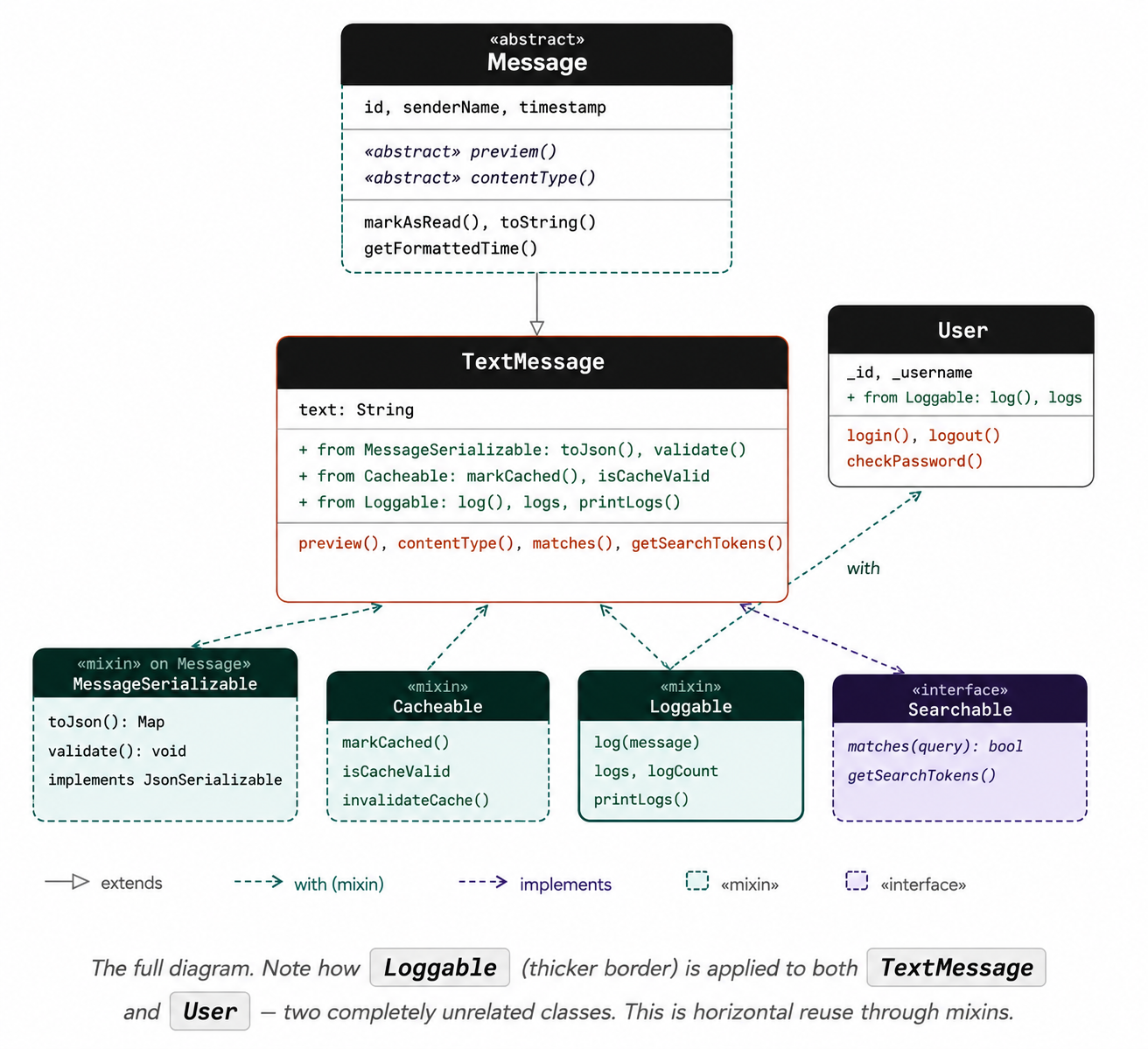
12. The full class diagram
13. Exercises
Exercise 1 — Add Cacheable to User
Mix Cacheable into the User class. Override cacheDuration to return a longer TTL (say, 30 minutes) since user profiles change less frequently than messages. Write a main() that creates a User, marks them cached, checks validity, then calls invalidateCache() and checks validity again. Also write a helper function void refreshIfNeeded(Cacheable c) that prints “Cache valid, skipping” or “Refreshing cache…” depending on isCacheValid — and call it with both a User and a TextMessage.
Exercise 2 — Searchable ChatRoom
Make ChatRoom implement Searchable. Its matches(query) should return true if the room name matches. Its getSearchTokens() should return all tokens from the room name plus all tokens from all messages that are themselves Searchable. Write a function List<Searchable> findAll(List<Searchable> items, String query) that returns all matching items — and verify that a list containing both ChatRoom and TextMessage objects can be searched polymorphically.
Exercise 3 — Compose a full message pipeline
Build a MessagePipeline class using composition (not inheritance). It should hold a List<Message> internally and expose three operations: add(Message m) — validates and caches the message if it implements JsonSerializable and Cacheable; search(String query) — returns all messages that implement Searchable and match the query; and exportAll() — returns a List<Map> of all messages that implement JsonSerializable. This exercise demonstrates how composition, interfaces, and mixins work together in a real service.