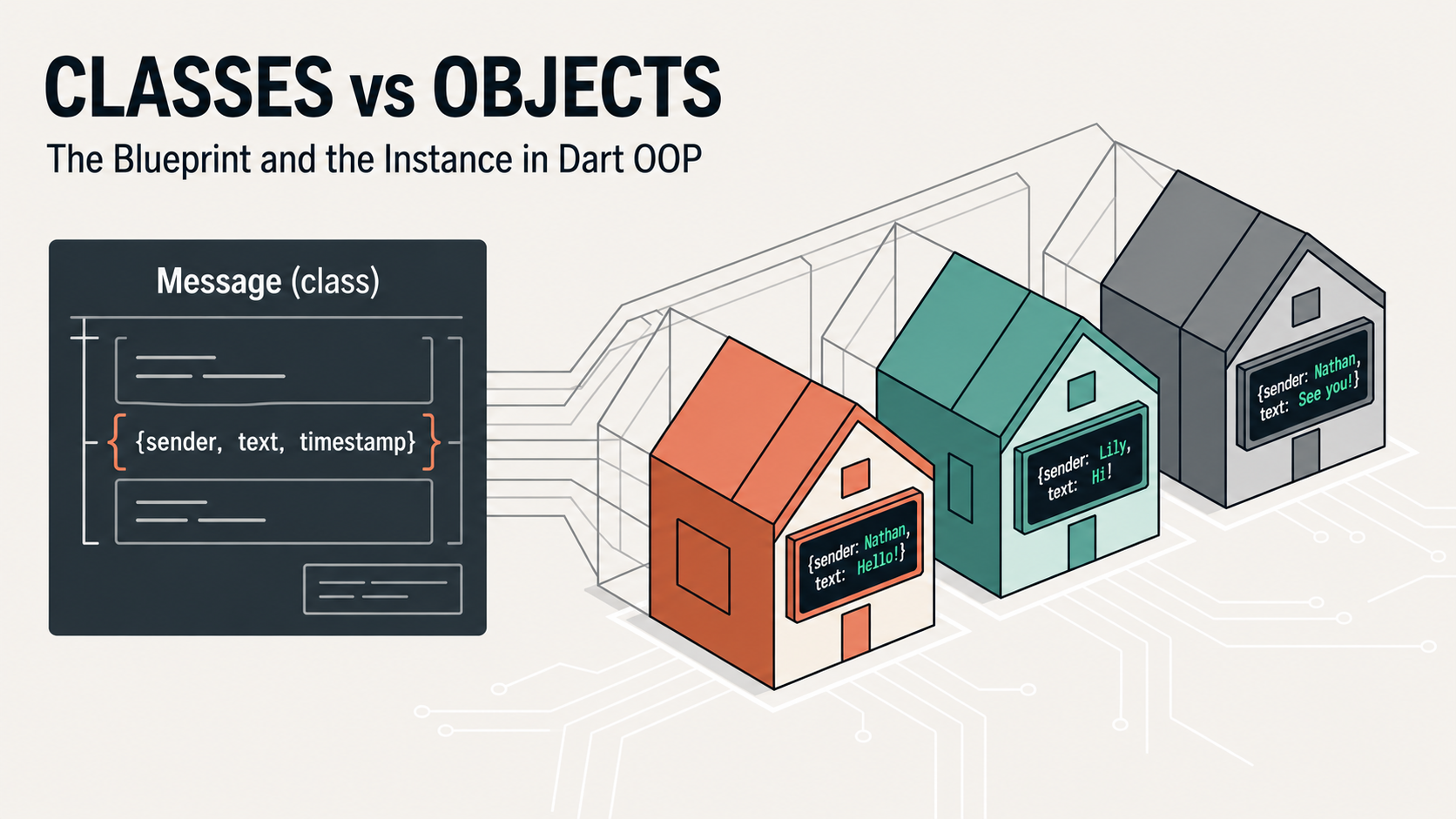
Understanding the building blocks of every OOP program — and writing your first real class.
Everything in this series is built toward one goal: a fully working chat application, designed and written in Dart using real object-oriented principles. By the end of this first article you will have created the first piece of that system — the Message class — and you will understand exactly why we build it the way we do.
1. What is Object-Oriented Programming?
Before we write a single line of Dart, let’s understand why OOP exists.
Imagine you are writing a chat application. You need to track hundreds of messages, each with its own sender, text, timestamp, and delivery status. Without any structure, you might store all of this in a jumble of variables:
// Without OOP — this gets messy fast
String message1Text = 'Hello!';
String message1Sender = 'Nathan';
DateTime message1Time = DateTime.now();
bool message1IsRead = false;

String message2Text = 'Hi there!';
String message2Sender = 'Lily';
DateTime message2Time = DateTime.now();
bool message2IsRead = true;
This works for two messages. But what about 2,000? What happens when you want to find all unread messages from Nathan? You’d be searching through a chaotic list of disconnected variables with no clear relationship between them.
Object-Oriented Programming solves this by letting you bundle related data and behaviour together into a single, coherent unit called an object. Instead of twenty separate variables, you have one Message that knows its own sender, its own text, and can even mark itself as read.
Core idea
OOP organises code around objects — bundles of data (what a thing is) and behaviour (what a thing can do) — rather than around a sequence of instructions.
Dart is a fully object-oriented language. Every value in Dart, including numbers, strings, and null, is an object. Learning OOP in Dart is not just a good idea — it is the only way to write serious Dart code.
2. Classes vs. objects — the blueprint analogy
The two most important words in OOP are class and object. They are related, but they are not the same thing.
Think of a class as a blueprint for a house. The blueprint describes what every house built from it will have: a number of rooms, a front door, windows. The blueprint itself is not a house — you cannot live in it. But from that one blueprint, you can build many houses.
Each house you actually build is an object (also called an instance). Every house follows the same blueprint, but each one exists independently. One house might be painted red, another blue. One might have its lights on. They share the same structure (defined by the class) but have their own state (their own data).
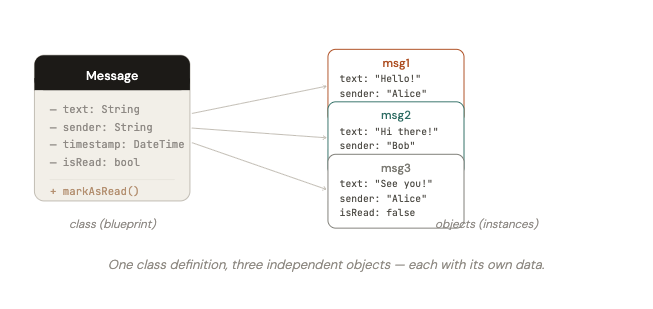
One class definition, three independent objects — each with its own data.
Quick rule
A class is defined once. Objects are created (instantiated) from it as many times as you need. The class is the plan; objects are the real things.
3. Your first Dart class
Let’s write a class in Dart. The syntax is straightforward: you use the keyword class followed by the name of your class, then a pair of curly braces that contains everything belonging to that class.
// A simple class definition
class Dog {
  // Everything that belongs to Dog goes here
}
That’s a valid Dart class! It doesn’t do much yet, but it compiles. By convention, Dart class names use UpperCamelCase — each word starts with a capital letter, no underscores.
Naming convention
Classes: UpperCamelCase → Message, ChatRoom, UserProfile
Variables and methods: lowerCamelCase → senderName, markAsRead()
4. Fields and methods
A class is made up of two kinds of members:
Fields (also called properties or instance variables) store the data that belongs to an object. They describe what an object is or has.
Methods are functions defined inside a class. They describe what an object can do.
Let’s add both to our Dog class:
class Dog {
  // ── Fields ────────────────────────────────────
  String name;      // each Dog has a name
  String breed;     // and a breed
  int age;          // and an age

  // ── Constructor (we'll cover this next) ───────
  Dog(this.name, this.breed, this.age);

  // ── Methods ───────────────────────────────────
  void bark() {
    print('Woof! My name is $name.');
  }

  void birthday() {
    age++;
    print('$name is now $age years old!');
  }

  String describe() {
    return '$name is a $age-year-old $breed.';
  }
}
Notice a few things about methods in Dart. They look just like regular functions — they have a return type, a name, parentheses for parameters, and a body. The difference is that they live inside a class and automatically have access to the class’s own fields via this (though you often don’t need to write this explicitly unless there’s a name conflict).
The void return type
When a method doesn’t return a value — it just does something (like printing to the console) — you mark its return type as void. Think of it as saying “this method returns nothing.”
Common mistake
Forgetting the return type is a compile error in Dart. Every method must declare what it returns — either a specific type like String or int, or void if it returns nothing.
5. Creating objects with constructors
A class definition alone doesn’t create any objects. To create an object, you call the class’s constructor. In its simplest form, a constructor looks like a method with the same name as the class.
void main() {
  // Creating objects using the constructor
  Dog rex = Dog('Rex', 'German Shepherd', 3);
  Dog luna = Dog('Luna', 'Labrador', 5);

  // Calling methods on objects
  rex.bark();           // Output: Woof! My name is Rex.
  luna.bark();          // Output: Woof! My name is Luna.

  // Accessing fields directly
  print(rex.name);     // Output: Rex
  print(luna.age);     // Output: 5

  // Objects are independent — changing one doesn't affect the other
  rex.birthday();       // Rex is now 4 years old!
  print(luna.age);     // Still 5 — Luna is unaffected

  print(rex.describe()); // Rex is a 4-year-old German Shepherd.
}
The shorthand constructor syntax
Dart has a very elegant shorthand for constructors that simply assign their parameters to fields. Instead of writing the assignment manually, you use this.fieldName directly in the parameter list:
// ❌ Long form (still valid, just more verbose)
Dog(String name, String breed, int age) {
  this.name = name;
  this.breed = breed;
  this.age = age;
}

// ✅ Short form — Dart's preferred style
Dog(this.name, this.breed, this.age);
Both do exactly the same thing. The shorthand version tells Dart: “take the first argument and assign it to this.name, the second to this.breed“, and so on. You’ll see this syntax everywhere in Dart code.
Dot notation
To access a field or call a method on an object, you use a dot (.) between the object’s variable name and the member you want:
objectName.fieldName      // reading a field
objectName.fieldName = x  // writing a field
objectName.methodName()   // calling a method
6. Reading a class diagram (UML basics)
Throughout this series, we will use class diagrams to visualise the structure of our code before and after writing it. These diagrams follow a standard notation called UML (Unified Modelling Language). You don’t need to memorise the whole standard — just the core conventions we’ll use.
A class is represented as a box divided into three sections:
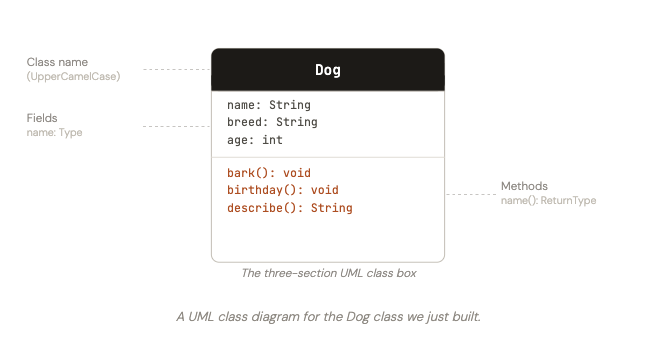
A UML class diagram for the Dog class we just built.
That’s all you need for now. In later articles we’ll add notation for relationships between classes (inheritance arrows, composition lines, and so on). For the moment, just remember: top = name, middle = fields, bottom = methods.
7. Building our chat app: the Message class
Now let’s apply everything we’ve learned to our running project. In a chat application, a message is a perfect candidate for a class. Every message shares the same structure: it has some text, a sender, a time it was sent, and a delivery status. These shared properties make a class the natural choice.
Step 1 — Design the class diagram first
Before writing code, it’s a good habit to sketch the class diagram. What data does a message need to hold? What can it do?
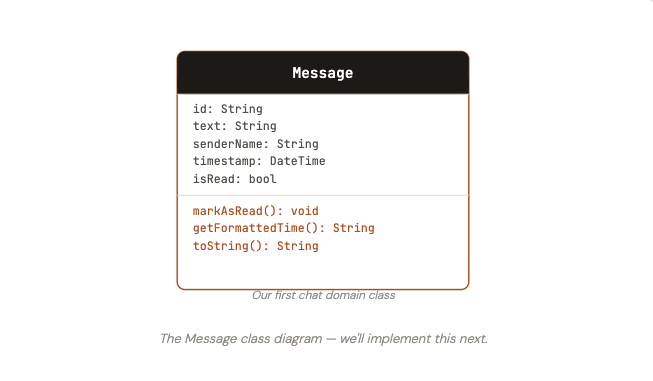
The Message class diagram — we’ll implement this next.
Step 2 — Implement the Message class
// message.dart
class Message {
  // ── Fields ────────────────────────────────────────
  String id;
  String text;
  String senderName;
  DateTime timestamp;
  bool isRead;

  // ── Constructor ───────────────────────────────────
  Message({
    required this.id,
    required this.text,
    required this.senderName,
    required this.timestamp,
    this.isRead = false,  // defaults to unread
  });

  // ── Methods ───────────────────────────────────────

  /// Marks this message as read.
  void markAsRead() {
    isRead = true;
  }

  /// Returns the time as a human-readable string, e.g. "14:35".
  String getFormattedTime() {
    String h = timestamp.hour.toString().padLeft(2, '0');
    String m = timestamp.minute.toString().padLeft(2, '0');
    return '$h:$m';
  }

  /// A readable description of this message — useful for debugging.
  @override
  String toString() {
    return '[${getFormattedTime()}] $senderName: $text';
  }
}
Step 3 — Use the Message class
// main.dart
void main() {
  // Create two message objects
  final Message msg1 = Message(
    id: 'msg_001',
    text: 'Hey! Are you free tonight?',
    senderName: 'Nathan',
    timestamp: DateTime(2026, 1, 15, 18, 30),
  );

  final Message msg2 = Message(
    id: 'msg_002',
    text: 'Yes! Let\'s grab dinner.',
    senderName: 'Lily',
    timestamp: DateTime(2026, 1, 15, 18, 32),
  );

  // Print messages — calls our toString() method
  print(msg1); // [18:30] Nathan: Hey! Are you free tonight?
  print(msg2); // [18:32] Lily: Yes! Let's grab dinner.

  // Check read status
  print(msg1.isRead);  // false

  // Mark as read and verify
  msg1.markAsRead();
  print(msg1.isRead);  // true
  print(msg2.isRead);  // false — msg2 is unaffected

  // Use a list to hold multiple messages
  final messages = [msg1, msg2];

  print('\n── Conversation ──');
  for (final msg in messages) {
    print(msg);
  }
}
A few things are worth noticing in this implementation:
We used named parameters in the constructor (wrapped in curly braces {}). This makes calling the constructor much more readable — instead of Message('msg_001', 'Hey!', 'Nathan', ...), you can see exactly what each argument means. The required keyword means the caller must provide that argument.
We gave isRead a default value of false. New messages are always unread — this is encoded directly in the class definition so callers don’t have to specify it every time.
The @override annotation on toString() tells Dart (and other developers) that we are deliberately replacing a method inherited from Dart’s built-in Object class.
8. Exercises
The best way to cement these concepts is to write code. Here are three exercises, in increasing difficulty:
Exercise 1 — The Book class
Create a Book class with fields for title, author, yearPublished, and isAvailable (whether it can be borrowed from the library). Add a method checkout() that sets isAvailable to false, a method returnBook() that sets it back to true, and a toString() that prints a readable description. Create three Book objects and test all the methods.
Exercise 2 — Extend the Message class
Add a method preview(int maxLength) to the Message class that returns a shortened version of the message text. If the text is longer than maxLength characters, it should return the first maxLength characters followed by .... Otherwise it should return the full text.
Example: msg.preview(10) on “Hey! Are you free tonight?” should return "Hey! Are y..."
Exercise 3 — A list of messages
Create a main() function that builds a List<Message> with at least five messages from different senders. Then write a loop that prints only the unread messages. Finally, mark all messages as read and verify the list is now empty when filtered for unread.
What we covered in this article
- OOP organises code around objects — bundles of data and behaviour
- A class is a blueprint; objects are the real instances created from it
- Classes contain fields (data) and methods (behaviour)
- Objects are created using a constructor, called with the class name
- Dart’s shorthand constructor syntax (
this.fieldName) is clean and idiomatic - Named parameters with
requiredmake constructors more readable and safe - UML class diagrams have three sections: name, fields, methods
- We built our first chat domain class:
Message